
Order too early and you tie up cash in stock you don’t need yet. Order too late and you sell out before the next shipment lands, turning away customers you paid to acquire.
The reorder point is the stock level that splits the difference, and the reorder point formula turns it into a number you can set once and reuse every cycle.
This guide walks through the formula, the three inputs it runs on, and how to set a reorder point for every SKU without recalculating by hand.
It’s one of the core moves in day-to-day inventory management, and the math is simpler than the software vendors make it look.
What is a reorder point?
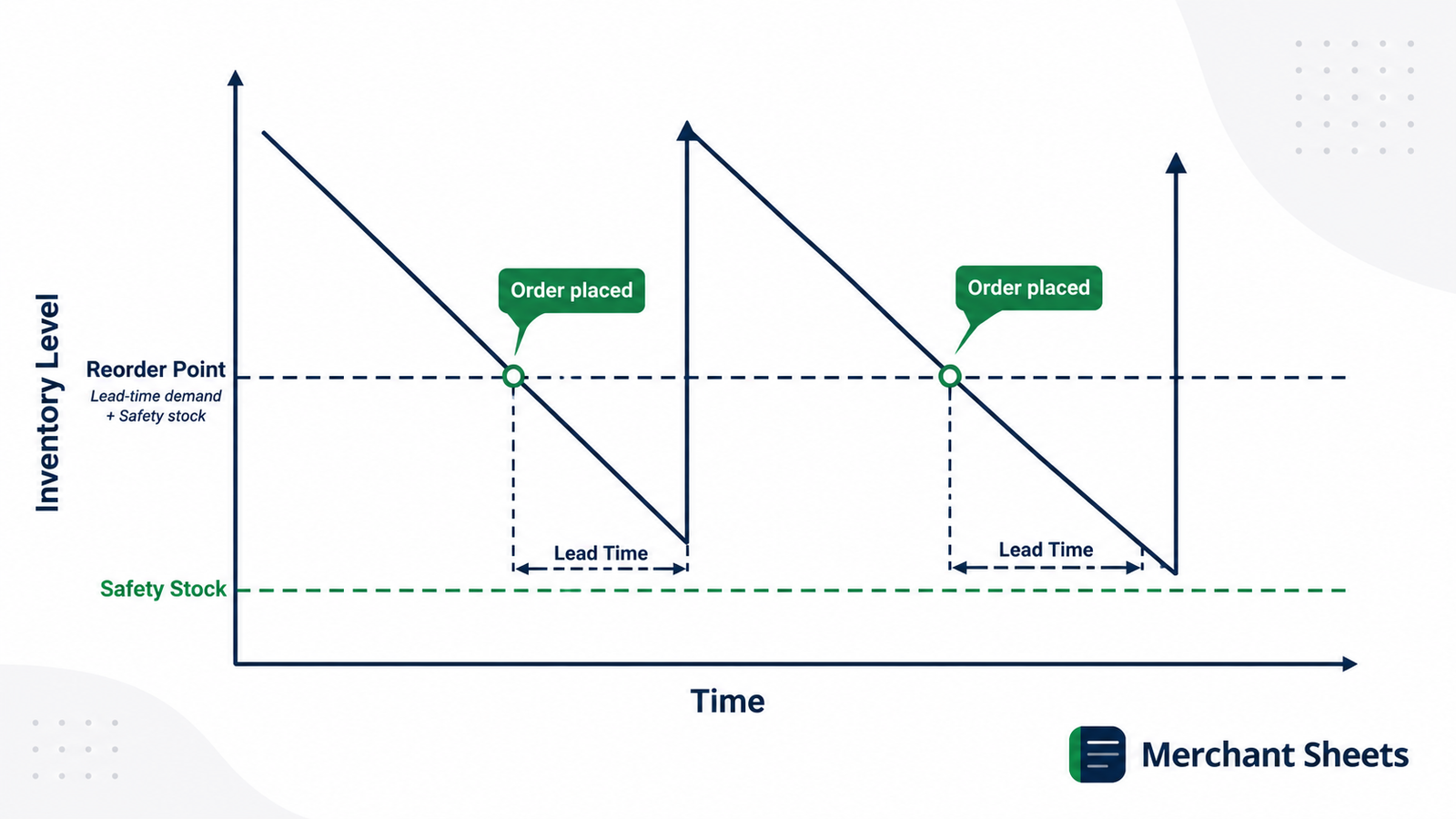
A reorder point is the stock level at which you place a replenishment order, set so new inventory arrives before you run out. It answers one question — when to reorder — as a quantity on hand. Once a SKU drops to its reorder point, that’s the signal to cut a purchase order to your supplier.
The reorder point has two parts. The first is lead time demand: the units you expect to sell between placing an order and receiving it. The second is safety stock: a buffer that covers the weeks you sell faster than usual or the supplier ships later than promised.
Add them together and you get a trigger level that keeps you selling while the next shipment is in transit.
Without a reorder point, you’re watching stock by eye and ordering on a hunch. That holds up for a handful of SKUs and breaks the moment the catalog grows, because every product has its own demand and its own supplier, so they each hit the danger zone on a different day.
The reorder point formula
The reorder point formula adds your lead time demand to your safety stock:
Reorder point = (average daily demand × lead time in days) + safety stock
Take a SKU that sells 12 units a day, with a 20-day lead time and 60 units of safety stock. Its lead time demand is 12 × 20 = 240 units, and adding the buffer gives a reorder point of 300.
When stock on hand hits 300, you order. The same three inputs set the trigger for any SKU, whatever the numbers:
The reorder point formula applied across four SKUs
| SKU | Avg daily demand | Lead time (days) | Safety stock | Reorder point |
| A | 12 | 20 | 60 | 300 |
| B | 5 | 14 | 25 | 95 |
| C | 40 | 30 | 200 | 1,400 |
| D | 3 | 45 | 40 | 175 |
Notice how SKU C towers over the rest. High daily demand and a long lead time compound each other, so a fast mover with a slow supplier needs the most stock on hand before it’s safe to wait on a shipment.
The three inputs, and where to get them
The formula is quick. The accuracy lives in the inputs, and each one comes from a different place in your business.
- Average daily demand: Pull your daily demand from sales history — total units sold over a recent period, divided by the number of days in it. Use a window that reflects how the SKU sells now, not a year ago, and treat seasonal products by their season rather than a flat annual average.
- Lead time: Measure your supplier lead time from your own receiving records: the days from placing a purchase order to stock being shelf-ready. Average several recent orders, and note the longest — supplier slippage is where stockouts start.
- Safety stock: This is the buffer that absorbs the swings the averages miss. Sizing your safety stock has its own method built on demand and lead-time variability, and it feeds straight into the reorder point.
Reorder point with and without safety stock
You’ll see the reorder point written two ways, and the difference is safety stock. The bare version uses lead time demand alone; the buffered version adds the cushion on top.
- Without safety stock: 12 × 20 = 240. The trigger sits at exactly what you expect to sell during the lead time.
- With safety stock: 240 + 60 = 300. The extra 60 units cover a hot week or a late shipment.
The bare version assumes an average world: average sales every day and a supplier who never slips. Run at 240 and a single week that sells 20% above plan, or a shipment that arrives five days late, empties the shelf before the reorder lands.
A bare lead-time-demand point is defensible when demand is steady and the supplier is genuinely reliable.
For everyone else, the safety stock is what keeps the reorder point from failing exactly when demand is strongest.
The size of that buffer is a judgment call between the cost of a stockout and the cash a bigger cushion ties up, which is the trade-off the safety stock method is built to settle.
What changes when demand and lead time vary?
Average inputs describe a smooth world, and real demand spikes while suppliers slip. When either swings, a reorder point built on averages triggers too late. The fix is to size the trigger against the bad case, not the typical one.
The max-based approach uses your worst realistic numbers: maximum daily demand × maximum lead time. For SKU A, an 18-unit peak day and a 26-day worst-case lead time put the trigger near 468 rather than 300.
That gap is the cost of protecting a volatile SKU, and it’s why lead-time reliability usually moves the reorder point more than demand does — a supplier that swings from 20 to 40 days shifts the number further than a normal sales week ever will.
A reorder point is only as current as its inputs. Recalculate monthly for most SKUs, and weekly for seasonal or fast-moving ones, so the trigger tracks how the product sells today rather than how it sold last quarter.
How is a reorder point different from safety stock and reorder quantity?
These three terms get used interchangeably, and they answer different questions. The reorder point is when to order. Safety stock is the buffer inside that number.
The reorder quantity — often set with the economic order quantity formula — is how much to buy each time. You need all three to run replenishment: one says when, one protects against surprises, and one sets the order size.
Reorder point vs safety stock vs reorder quantity
| Term | What it answers | Rough formula | The decision it drives |
| Reorder point | When to order | (avg daily demand × lead time) + safety stock | Cut a purchase order now |
| Safety stock | How big a buffer to hold | (max daily × max lead time) − (avg daily × avg lead time) | How much cushion to carry |
| Reorder quantity | How much to order | Economic order quantity (EOQ) | The order size per PO |
Calculating reorder points across your whole catalog
One SKU is arithmetic. A few hundred is a system, and that’s where reorder points either earn their keep or quietly rot. The move is to lay the inputs side by side so every trigger updates itself.
Put each SKU on a row with its average daily demand, lead time, and safety stock in columns, and let the reorder point calculate from them. Update the inputs and every trigger re-sizes at once, so a supplier who slows down or a product that takes off changes the number without a manual pass.
Add a flag that compares stock on hand to the reorder point, and the sheet surfaces exactly what to order today. Watch the buffers, too: a reorder point set too high carries cash tied up in inventory that could be funding your next order instead.
That side-by-side setup is the Reorder Point + Safety Stock Calculator. It runs the formula per SKU on your demand and lead-time inputs, sizes the safety stock, and flags what’s due to reorder, so the whole catalog stays current from one sheet.
Set a reorder point for every SKU
Reordering by feel works until the catalog outgrows your memory. A stockout on a good seller costs you the sale and the ad spend that won it; an overstock on a slow one buries cash on the shelf. A reorder point per SKU replaces the guesswork with a trigger you can trust.
Start from real demand and lead time and let the sheet do the rest. The Reorder Point + Safety Stock Calculator runs the reorder point formula for every SKU on your own numbers, sizes the safety stock, and flags what’s due to order, so a low stock level turns into a reorder date instead of a stockout.
Frequently asked questions
What’s the difference between a reorder point and safety stock?
A reorder point is the stock level that triggers a new order, while safety stock is the buffer built into that level to cover demand and lead-time swings. Safety stock is one component of the reorder point: the reorder point is your lead-time demand plus that buffer, so hitting the trigger still leaves the cushion intact while the next shipment arrives.
Does the reorder point include safety stock?
Yes, a properly set reorder point includes safety stock — it’s the sum of lead-time demand (average daily demand × lead time) and your safety stock buffer. Leaving safety stock out sets the trigger at the average case, so a busier-than-usual week or a delayed shipment turns into a stockout.
How often should you update your reorder point?
Recalculate your reorder point whenever demand or lead time shifts, which for most SKUs means monthly and for seasonal or fast-moving ones means weekly. Because the formula runs on average daily demand and lead time, a reorder point set six months ago can be well off after a demand spike or a change of supplier.
What’s the difference between reorder point and reorder quantity?
The reorder point tells you when to order, and the reorder quantity tells you how much. The reorder point is a stock level that triggers a purchase, while the reorder quantity — often set with the economic order quantity (EOQ) formula — is the number of units you buy each time, balancing ordering costs against holding costs.
