
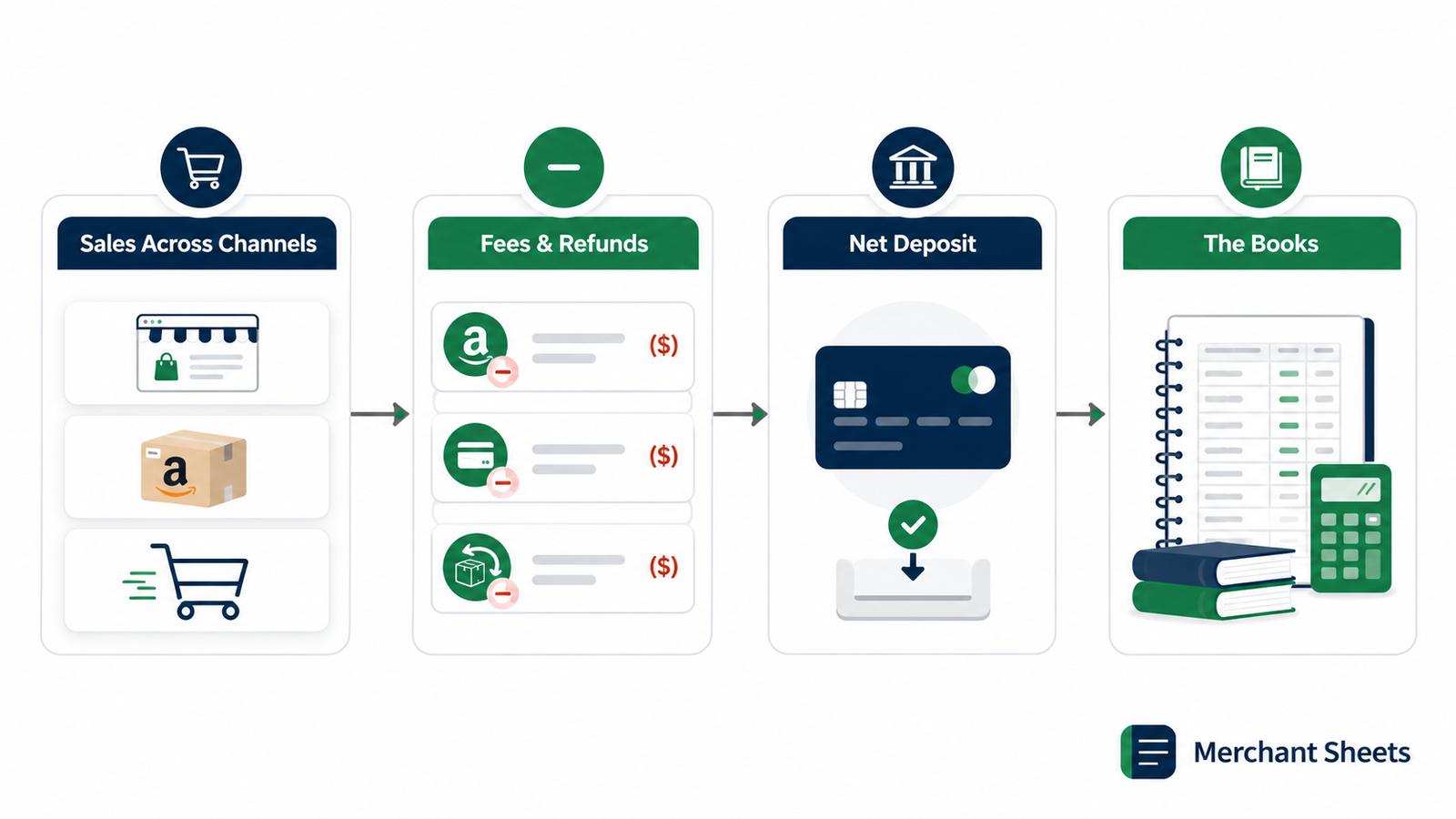
You started a store to sell products, not to keep books. But the numbers decide whether the business works, and ecommerce accounting is how you read them. It doesn’t have to be complicated.
This guide covers what a founder needs to track, in plain English: the handful of numbers that matter, how to keep them, and where a spreadsheet stops and real accounting software starts.
Most of what makes ecommerce accounting feel hard comes from selling across channels. A Shopify payout, an Amazon disbursement, and a refund three weeks later all hit your bank on different days, and they rarely match the sale that set them off. Get a system for that, and the rest is bookkeeping you can learn once and run on a monthly rhythm.
What is ecommerce accounting?
Ecommerce accounting is the practice of tracking the money moving in and out of an online store: sales, fees, refunds, inventory, and expenses, turned into numbers you can act on. It follows the same rules as any small-business accounting, with extra wrinkles from marketplace fees, held payouts, and inventory you carry as an asset.
A service business books revenue when it sends an invoice and carries few costs tied to each sale. A physical-products business is different on three fronts. It holds inventory (the stock you’ve bought but haven’t sold yet), pays a cut to every platform and processor, and absorbs returns.
Those three things are where most founder bookkeeping goes sideways, so they’re where this guide spends its time.
Sales tax adds one more layer, handled lightly here. Once your sales cross a state’s economic nexus threshold, you may need to collect and remit sales tax there, though marketplaces like Amazon often collect and remit it for you as a marketplace facilitator. It’s worth a conversation with a tax professional as you scale into new states.
The numbers every founder should track
You don’t need a finance degree to run a store. You need a short list of numbers you can trust and a rhythm for reading them. Track these and review them on schedule, and you’ll catch a margin or cash problem while it’s still small.
The core numbers to track, what each tells you, and how often to look.
| Number | What it tells you | How often |
| Net revenue | Sales after fees and refunds — your real top line | Monthly |
| COGS | The direct cost of the goods you sold | Monthly |
| Contribution margin | What a sale leaves after variable costs | Monthly |
| Operating expenses | The fixed overhead that runs whatever you sell | Monthly |
| Cash on hand | How long you can keep operating | Weekly |
| Inventory value | Cash sitting on your shelves as stock | Monthly |
Two of these do more work than the rest. Contribution margin sets the ceiling on what you can spend to win a customer, and it’s worth reading per channel rather than as one blended figure. Inventory value is the number founders forget is cash: every unit on the shelf is money you’ve already spent, which is why watching how fast it sells (its inventory turnover) matters as much as the balance.
When one blended margin hides your winners and your losers, a P&L by SKU breaks profit out product by product, so you can see which items carry the store and which quietly drain it.
Setting up a simple chart of accounts
A chart of accounts is the list of buckets you sort every transaction into, the categories that add up to your income statement. Start lean. A handful of accounts you use beats a sprawling list you guess at, and you can split any bucket later once it earns its own line.
Splitting revenue by channel is worth doing from day one. Shopify, Amazon, and wholesale carry different fees and margins, and separating them early means you can read each channel’s real contribution without untangling one lumped-together sales line months later.
A lean starter chart of accounts for a DTC store.
| Account | What goes here |
| Revenue by channel | Gross sales split by Shopify, Amazon, wholesale |
| Cost of goods sold | The unit cost of the products you sold |
| Merchant & marketplace fees | Payment processing, Amazon referral and FBA fees |
| Shipping & fulfillment | Outbound shipping, 3PL, pick-and-pack |
| Marketing | Ad spend, agencies, influencer and affiliate costs |
| Software & apps | Store platform, email, analytics, subscriptions |
| Owner pay | What you draw from the business |
Keep every transaction sorted into one of these, and your income statement builds itself.
Cash vs accrual: which one, and when to switch
Two methods decide when a sale or a cost lands on your books. Cash accounting records revenue when the money hits your account and an expense when you pay it. Accrual accounting records revenue when you earn it and a cost when you incur it, even when the cash moves later.
Cash is simpler and shows you what’s in the bank, which is why most new stores start there. Accrual gives a truer picture once inventory and timing get involved, because it matches the cost of a product to the month you sold it instead of the month you paid your supplier.
For inventory-heavy businesses the choice can be made for you. The IRS generally requires accrual for purchases and sales once you have to account for inventory, though a small-business exception lets you stay on the cash method when your average annual gross receipts run $30 million or less over the prior three years. Most founders move to accrual well before that, usually when they raise money or hand the books to a bookkeeper.
The reconciliation founders skip
Here’s the number that trips up almost every new store: the deposit from Shopify or Amazon is not your revenue. A platform pays you what’s left after its fees, refunds, chargebacks, and any payout it’s holding, so the money in your bank is always smaller than the sales that earned it, and the two rarely line up in the same week.
A worked example makes it concrete. Say you sold $10,000 in a week. Take out $300 in payment processing, $400 in refunds, and a $500 payout held for review, and $8,800 lands in your account. Book the $10,000 as revenue and the $1,200 in fees and refunds as costs. Book the $8,800 as revenue instead, and you understate your sales and hide where the money went.
Reconciliation is the habit of matching what each channel says it paid you against what actually hit the bank, every month. Do it and held payouts, fee changes, and missing deposits surface early, while they’re still cheap to fix. Doing it by hand across Shopify, Amazon, and your bank is where the routine breaks down.
A Multi-Channel Reconciliation sheet lines up each channel’s expected payout against real deposits and flags the gaps, so a held payout or a fee change reads as a number rather than a surprise.
Where a spreadsheet ends and QuickBooks begins
A spreadsheet is a fine place to start, and for some numbers it stays the best tool. Tracking margin, planning cash, and modeling a price change are spreadsheet work, because they’re about decisions, and a sheet lets you change one input and watch the effect ripple through.
Dedicated accounting software earns its place when you need the bookkeeping itself: a clean general ledger, tax-ready financial statements, and a record a bookkeeper or accountant can work from. QuickBooks and Xero are the common choices, and both connect to Shopify and Amazon so transactions flow in with less manual entry.
A good setup uses both. The software keeps the official books; the spreadsheet answers the what-if questions the books can’t. Make the move to software once manual entry eats real time each month, or the first time you need financials for a lender, an investor, or a tax filing.
A simple monthly close routine
Closing the books means finalizing a month’s numbers so you can trust them. A repeatable routine keeps it to an hour or two, and the order below moves from raw data to the decisions the numbers point to.
- Pull your payouts: Download the payout and settlement reports from each channel for the month. These are the source of truth for what you actually collected.
- Reconcile to your bank: Match each expected payout to the deposit that landed, and note any gap. Held payouts and fee drift show up here first.
- Update COGS and inventory: Record the cost of what sold and adjust your inventory value for what you bought and received. This keeps margin honest.
- Categorize expenses: Sort the month’s spending into your chart of accounts. Consistent categories make every future report faster.
- Review the P&L and cash: Read your profit and loss and your cash position against the prior month. Watch the trend, and act on anything that moved.
Frequently asked questions
Do I need an accountant for my ecommerce business?
Not at the start, since most founders can keep clean books themselves with a simple system and accounting software. Bring in a bookkeeper or accountant when the monthly close eats too much of your time, when you’re raising money, or when tax gets complex enough that a mistake costs more than the help. Many stores run the monthly close with a bookkeeper, call in an accountant at tax time, and keep the day-to-day tracking in-house.
Should I use cash or accrual accounting for a small store?
Cash accounting is fine when you’re small and carry little inventory, because it’s simpler and mirrors your bank balance. Move to accrual once inventory and timing distort the picture, or when a lender or investor expects it. The cash or accrual accounting decision can also be set by the IRS once you have to account for inventory, so confirm your method with an accountant as you grow.
When should I move off spreadsheets?
Move the official books to accounting software once manual entry takes real time each month or you need tax-ready statements for someone else. Keep using spreadsheets for the planning work, margin, pricing, and cash forecasting, where changing an input and seeing the result is the whole point. Most growing stores run both side by side.
Track the money that hits your bank
Clean books start with one habit: knowing that the deposit in your account matches the sales behind it. That reconciliation is the piece founders skip and the one that quietly costs the most, because a held payout or a creeping fee hides in plain sight until you go looking.
The Multi-Channel Reconciliation template compares each channel’s expected payout against your actual deposits and flags the variances: held funds, fee drift, missing money, before they become a problem. Set your books on solid ground, and every other number you track gets more trustworthy. Get the template.
