
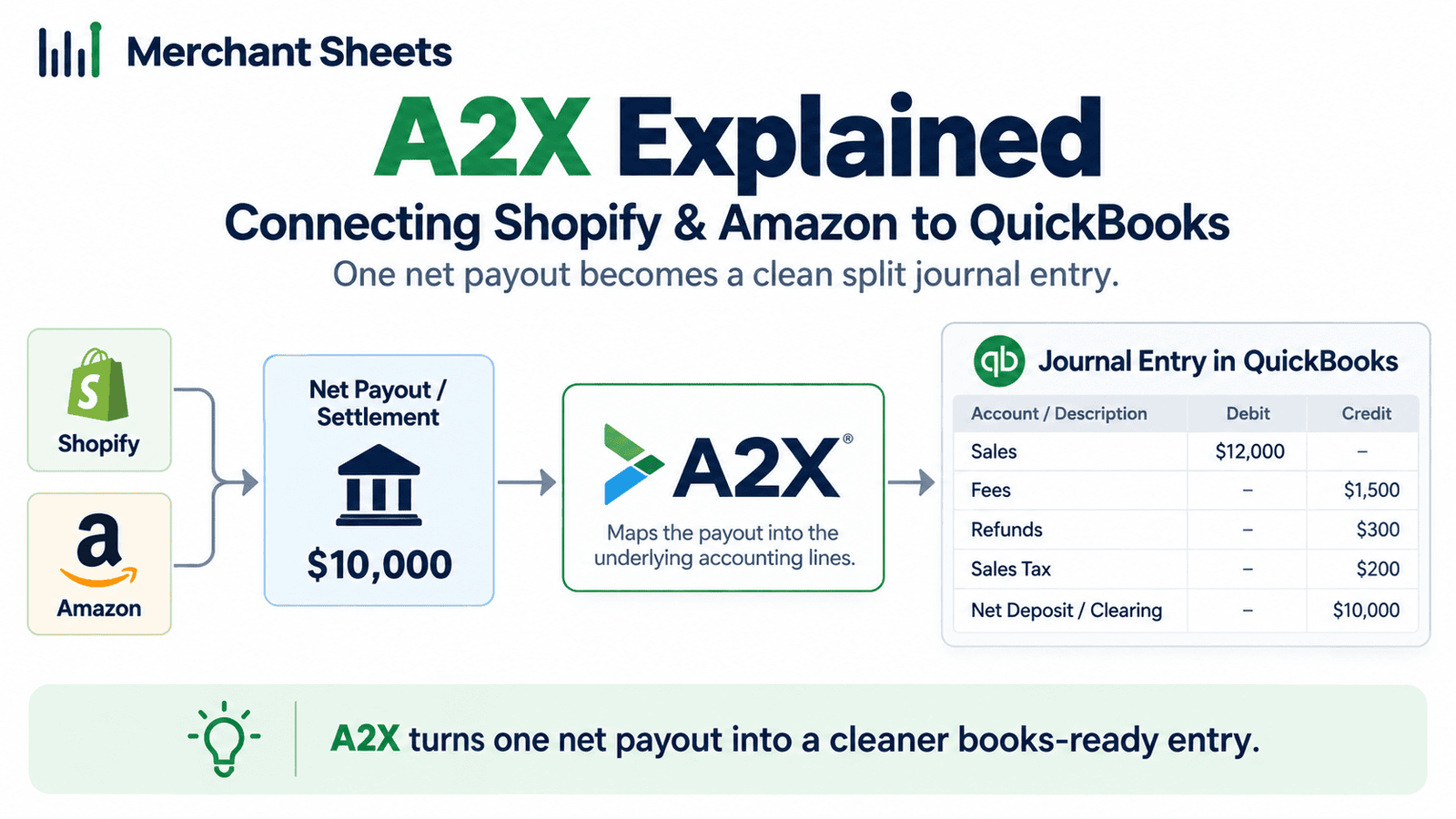
Key takeaways
- A2X is a connector that sits between your sales channels and your accounting software; it doesn’t replace QuickBooks or your bookkeeper, it feeds them clean numbers.
- For each payout, A2X posts one summary journal entry that splits the deposit into sales, marketplace fees, refunds, and sales tax, and its net matches the amount your bank received.
- Because the summary matches the deposit, you reconcile a whole settlement in QuickBooks in one click, and A2X splits a payout that straddles month-end into two entries so accrual accounting stays clean.
- A2X supports accrual accounting only, connects to QuickBooks Online, Xero, Sage, and NetSuite, and works with Amazon, Shopify, Walmart, eBay, Etsy, and PayPal.
- A2X can post cost of goods sold and inventory journals, but only once you give it a cost for each product; it isn’t an inventory-management system and it doesn’t calculate your costs for you.
- A2X starts around $29 a month per platform and scales with order volume, and it pays for itself once reconciling your channels by hand takes more than an hour or two a month.
A single Amazon or Shopify payout isn’t your revenue. It’s sales, minus fees, minus refunds, minus tax, minus a held-back reserve, all netted into the one number your bank received. A2X un-nets it. Here’s what it does, how you use it to connect Shopify and Amazon to QuickBooks, and who it’s worth it for.
What is A2X?
A2X is ecommerce accounting software that connects your sales channels to your accounting ledger. For every payout, it pulls the settlement data, groups it into a summary journal entry that splits out sales, fees, refunds, and tax, and posts that entry to QuickBooks Online, Xero, Sage, or NetSuite so it reconciles against your bank deposit.
A settlement is the batched payout a channel sends you, net of its fees; a journal entry is the accounting record that books those amounts to the right accounts.
It helps to be clear on what A2X is. It’s the connective layer that solves one specific, painful problem, batched ecommerce payouts, that accounting software alone handles badly. It doesn’t keep your books for you, and it doesn’t replace your bookkeeper or accountant.
The broad question of how to run the books is covered in the complete ecommerce bookkeeping guide, and this article is the tool-level detail underneath it: what A2X posts, how to connect it to QuickBooks, and when it earns its subscription.
The problem A2X solves: a payout isn’t your revenue
When Amazon or Shopify pays you, the deposit that lands in your bank is a net figure. It’s gross sales, minus marketplace and processing fees, minus refunds, minus the sales tax the platform collected, minus any reserve the channel holds back.
Book that deposit as revenue and you understate real sales, you never see your fee load, and your tax is wrong. Book every order by hand instead and you’re accurate in theory, but nobody reconciles thousands of orders a month that way.
| A payout isn’t your revenue. It’s sales minus fees, refunds, tax, and a reserve, netted into one number. A2X un-nets it into a journal entry that reconciles to the deposit. |
That gap between the deposit and the truth is what A2X fills. It takes the settlement behind each payout and breaks it back into its parts, so the numbers that reach QuickBooks are the real ones and the deposit still ties to the penny. Here’s what’s hiding inside a single payout.
Table 1. What’s inside a single ecommerce payout, and where each part belongs.
| Line in the payout | What it is | Where it should book |
| Gross sales | The full order value before anything comes out | Revenue |
| Marketplace and processing fees | Referral, FBA, and payment fees the channel keeps | Fees expense |
| Refunds | Returns netted against the period’s sales | Contra-revenue |
| Sales tax | Tax the channel collected, and on marketplaces remits | Tax liability |
| Reserve | Funds the channel holds back and releases later | Reserve or clearing |
| Net deposit | What your bank received | Matches the A2X summary entry |
How A2X works: the summary settlement journal
For each settlement period, A2X creates one summary journal entry in your ledger. It lists that period’s sales, marketplace fees, refunds, and sales tax as separate lines, and the net of those lines equals the payout your bank received.
That’s the whole trick. Because the entry matches the deposit, QuickBooks finds the match and you reconcile the entire settlement in one click, with the underlying settlement report attached to the entry in case you ever need the detail.
A worked example makes it concrete. Say Amazon deposits $12,300 for a two-week settlement. That figure isn’t $12,300 of revenue. Behind it might sit $18,000 in product sales, minus $2,700 in referral and FBA (Fulfillment by Amazon) fees, minus $600 in refunds, minus $1,900 in sales tax Amazon collected and will remit, minus a $500 reserve it’s holding back.
A2X posts one entry with each of those on its own line, and the net, $12,300, is what reconciles against the bank.
Three details separate that from a raw import of orders. A2X posts on an accrual basis, recording sales and costs in the period they belong to, and if one payout spans two months it posts two entries so each month is stated correctly.
It reconciles most payouts without leaving an unexplained balance in a clearing account, the holding account sales would otherwise sit in between the order and the payout. And it maps each line to a specific account in your chart of accounts and a tax rate you set once, so sales, fees, and tax always land in the right place.
A2X groups by settlement, not by order, which is the point. You get one clean entry a fortnight from Amazon or one every few days from Shopify, instead of thousands of individual sales cluttering the ledger.
The mapping is a one-time decision that then runs on its own, and A2X remembers new transaction types as they appear so you’re only asked to place something the first time it shows up.
How do you connect Shopify and Amazon to QuickBooks with A2X?
Connecting A2X sits it between your channels and QuickBooks, and setup usually takes under an hour, most of it spent deciding your account mapping once. Shopify and Amazon are separate A2X subscriptions, and if you sell across several Amazon marketplaces they can consolidate into one. The channel-side bookkeeping itself lives in Shopify accounting and Amazon seller bookkeeping; A2X is the piece that carries each channel’s settlements into QuickBooks. Work through these steps:
- Sign up for A2X and connect it to your QuickBooks Online company.
- Connect your first sales channel, your Shopify store or your Amazon Seller Central account, consolidating multiple Amazon marketplaces where you sell in more than one.
- Set your account and tax mappings: tell A2X which QuickBooks account each line (sales, fees, refunds, sales tax) posts to, and which tax rate applies. This is the step that pays off later, so get it right once.
- Let A2X pull your recent settlements, review the first few summary entries, and post them.
- Reconcile each summary entry against its bank deposit in QuickBooks, then turn on auto-posting so future settlements flow through on their own.
- Repeat for Amazon as a second channel with its own mapping, so both channels post into the same QuickBooks with their fees and tax kept straight.
What A2X does and doesn’t do
Half the questions people ask about A2X are really about its edges, so it’s worth drawing them clearly. On the cost of goods sold (COGS) side especially, be precise about the boundary: A2X posts a COGS and inventory-asset journal for each settlement, but only after you give it an average cost for each product, typed into A2X, pulled from a linked inventory system, or fed from a spreadsheet. It records the accounting, it doesn’t value your inventory or track stock levels. For where those costs come from, see landed-cost COGS. The full split of what A2X handles and what still needs you or another tool is below.
Table 2. What A2X handles, and what still needs you or another tool.
| A2X does | A2X doesn’t |
| Posts one accrual summary journal per settlement | Cash-basis accounting |
| Splits sales, fees, refunds, and tax to mapped accounts | Categorize operating expenses like rent or software |
| Matches the payout so it reconciles in one click | Reconcile or close your books for you |
| Posts COGS and inventory journals when fed product costs | Value inventory or track stock levels |
| Handles multiple channels and multi-country tax rules | Replace QuickBooks or your bookkeeper |
| Connects to QuickBooks Online, Xero, Sage, NetSuite | Work with channels it doesn’t support |
A2X vs the native connector vs booking it yourself
There are three common ways to get channel sales into QuickBooks, and they’re not equal. The native Shopify or Amazon connector imports orders and payouts, but it tends to clutter the ledger with individual transactions and doesn’t cleanly reconcile to the payout once fees come out.
Booking it yourself from the bank feed is accurate only if you re-derive fees, refunds, and tax by hand every month, which is where most self-kept books quietly drift. A2X summarizes to the payout and splits the parts, so the ledger stays clean and reconciles.
Other settlement-summary connectors work the same way at a high level, Link My Books among them; the mechanic is what matters here.
A couple of setups need extra care whichever route you take. If you sell in more than one currency, each channel’s payout has to land in the matching currency account so exchange differences don’t distort revenue, and subscription tools like Recharge or Bold record their own charges, so you’ll want those reconciled alongside the settlement rather than double-counted.
A2X handles the settlement itself; these adjacent pieces are worth confirming during setup so nothing posts twice.
The honest part is about fit. A2X is a subscription, so it pays back only when reconciliation is real work. For a low-volume brand under roughly $200,000 in sales, booking a single monthly settlement summary by hand can cost less than the subscription.
The tool earns its keep once you’re running real order volume, selling on more than one channel, or paying someone by the hour to reconcile, which is the point at which the manual route stops being cheap.
If you already sell on both Shopify and Amazon, that threshold is usually behind you, and A2X becomes the engine that lets you reconcile every channel into one set of books.
What does A2X cost, and when is it worth it?
A2X is billed monthly per platform and scales with your order volume. The entry tier starts around $29 a month for a low order count and no COGS, the cost feature turns on from the next tier up, roughly $45 a month on Shopify and $59 on Amazon, and the plans climb from there as volume grows into the hundreds and thousands of orders. Shopify and Amazon are separate subscriptions, so a brand on both pays for both.
The current tiers and order limits are on A2X’s own pricing pages, and they change, so confirm them before you budget.
The worth-it math is a simple comparison. Put the monthly subscription next to what reconciling your channels by hand costs you. If tying out Shopify and Amazon takes a few hours a month, and your time or a bookkeeper’s runs anywhere from $30 to $100-plus an hour, the tool pays for itself almost immediately at real volume
Below that, at a few hundred orders a month on a single channel, it may not, and there’s no shame in waiting until the volume justifies it. Here’s where the entry pricing sits today.
Table 3. A2X entry pricing by platform (as of 2026; confirm on the official pricing pages).
| Platform and tier | Approx. monthly price | Order limit | COGS included? |
| Shopify, Mini | $29 | 200 | No |
| Shopify, Basic | $45 | 500 | Yes |
| Shopify, Professional | $79 | 2,000 | Yes |
| Amazon, Mini | $29 | 200 | No |
| Amazon, Starter | $59 | 1,000 | Yes |
| Amazon, Standard | $79 | 5,000 | Yes |
| Higher volume | Up to $1,499+, then custom | 10k to 250k+ | Yes |
Frequently asked questions
Does A2X calculate COGS?
A2X posts a cost of goods sold and inventory journal for each settlement, but only after you give it an average cost per product, so it records the accounting rather than valuing inventory or tracking stock levels. That makes it a bookkeeping tool for COGS, not a replacement for an inventory-management system.
Does A2X replace QuickBooks or my bookkeeper?
No, A2X is a connector that feeds clean, split-out numbers into QuickBooks, so you still need the ledger, and someone still has to map accounts, reconcile, and close the month. It removes the data-entry grind, not the judgment.
Does A2X do cash-basis accounting?
No, A2X supports accrual accounting only, posting sales and costs to the period they belong to, which is the correct basis for a business that carries inventory anyway. If your accountant keeps you on a cash basis for tax, they can adjust from accrual books at year end.
Do I need separate A2X subscriptions for Shopify and Amazon?
Yes, Shopify and Amazon are billed as separate subscriptions, though multiple Amazon marketplaces can consolidate into a single Amazon plan. A brand selling on both channels budgets for two subscriptions.
How does A2X handle sales tax?
A2X splits the sales tax out of each payout and maps it to the account you choose, and on marketplaces that collect and remit for you it posts as a pass-through liability rather than income. That’s why marketplace and own-site sales are booked differently, a distinction covered in sales tax nexus.
Is A2X worth it for a small store?
Below roughly $200,000 in sales it often isn’t, because booking one monthly settlement summary by hand can cost less than the subscription. It starts paying back once you sell on more than one channel or reconciliation takes real time each month.
Can A2X import my historical transactions?
Yes, up to a limit set by your plan, with the entry tier including a few months of history and higher tiers including more, so you can post prior settlements when you first connect. That lets you bring the books current back to a clean starting point.
What accounting software does A2X connect to?
A2X connects to QuickBooks Online, Xero, Sage, and NetSuite, plus QuickBooks Desktop. If you’re still choosing between the two most common ledgers, the trade-offs are in QuickBooks vs Xero.
Get A2X set up so your books tie
A2X does the un-netting, but it won’t set your account mapping, reconcile each settlement, feed the product costs behind your COGS, or close the month, and a mapping done wrong once quietly misstates your books every month after.
Getting that right is part of what I do for ecommerce brands, and I’m A2X Certified, so I wire the connection to QuickBooks, get both Shopify and Amazon reconciling to their payouts, and leave you with a monthly close you can read.
If your channel numbers still don’t tie in QuickBooks, tell me how you sell today and I’ll map out what it takes to get them clean.
