
Key takeaways
- The QuickBooks integrations that matter for ecommerce cover four jobs: getting sales and payouts into the books, tracking inventory and COGS, handling sales tax, and paying bills. The marketplace has hundreds of apps; a brand needs a handful.
- The integration that matters most is a payout-summary connector like A2X or Link My Books, which posts each Shopify or Amazon payout as one clean journal entry that matches the bank deposit, so the books reconcile.
- Order-level connectors, including Intuit’s free Shopify and Amazon apps, sync individual orders. They work for a low-volume single-channel store, but they leave the deposits to reconcile by hand and get painful at scale.
- QuickBooks has no built-in full inventory platform since Intuit retired QuickBooks Commerce, the former TradeGecko. The Plus tier tracks basic inventory and COGS, and an app like Cin7, Katana, or Finale takes over when that runs out.
- A workable ecommerce stack is small: one payout connector, QuickBooks Online’s built-in bank feeds and sales tax, an inventory app only if you’ve outgrown Plus, plus bill pay and payroll as you grow.
- Check pricing before you commit, since app prices move. As of early 2026, A2X starts around $29 a month.
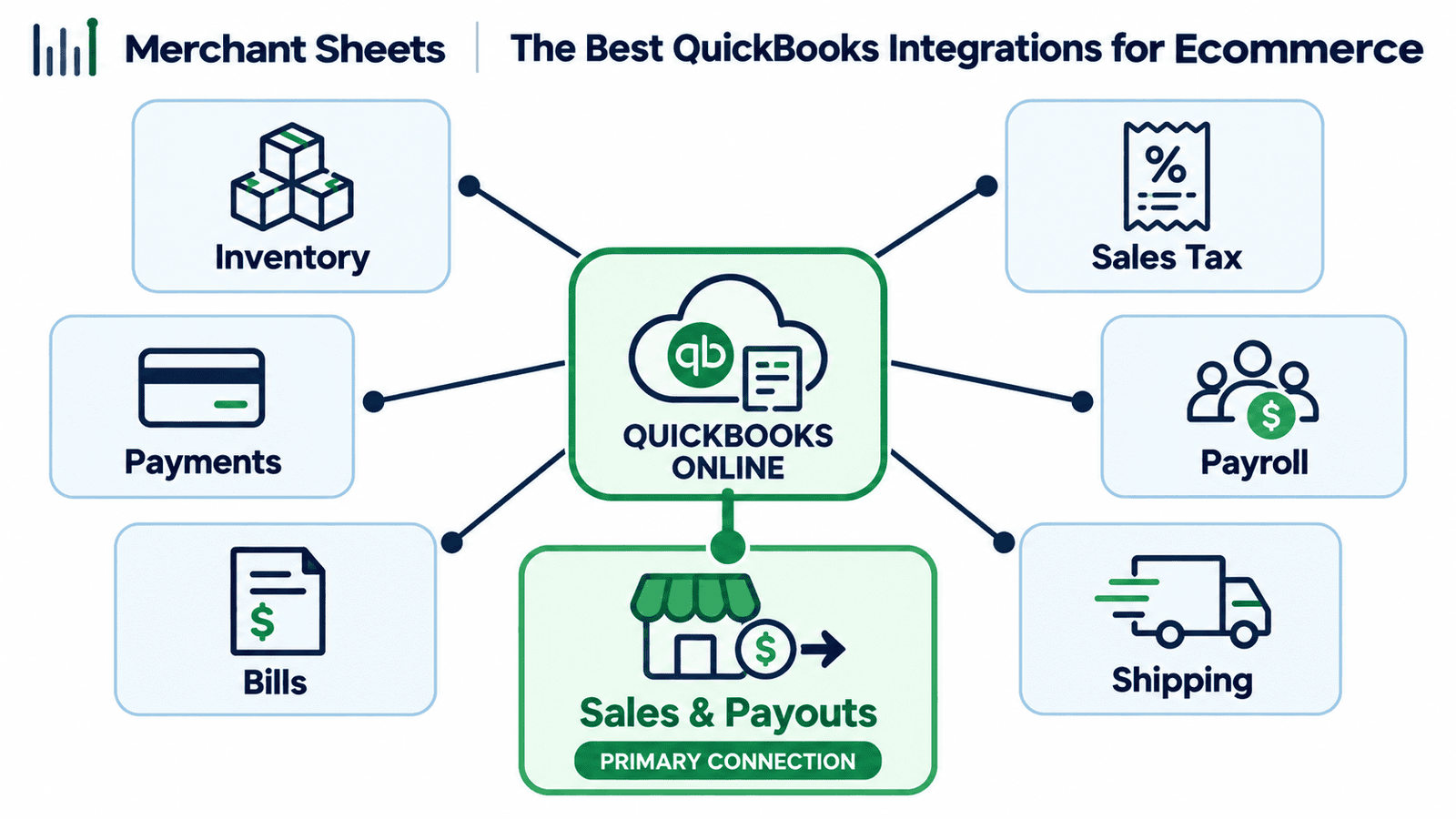
QuickBooks connects to hundreds of apps, and an ecommerce brand needs only a handful of them. The one that matters most brings your Shopify and Amazon sales and payouts into the books cleanly, so every bank deposit reconciles instead of landing as a mystery lump sum.
Below are the integrations worth using, sorted by the job each does, plus the lean stack that covers a real brand.
What are the best QuickBooks integrations for an ecommerce business?
The best QuickBooks integrations for ecommerce handle four jobs: a sales-and-payout connector such as A2X or Link My Books to bring Shopify and Amazon revenue into the books, an inventory app for when built-in tracking runs out, sales-tax handling, and bill pay.
Most of the marketplace is optional for a product business.
An integration is a connector that links another app to QuickBooks and syncs data between them. One earns a spot in your stack when it takes manual work out of a job you repeat every month, and that’s the test worth applying before you install anything.
Payroll and shipping tools come up further down, but four jobs carry the weight in keeping your ecommerce books straight:
- Sales and payouts
- Inventory and COGS
- Sales tax
- Bills and expenses
Sales and payout connectors: the integration that matters most
The sales-and-payout connector is the one that decides whether your books reconcile, so it’s the first to get right. Connectors work in one of two ways, and the difference is the whole game.
A payout-summary connector waits for the marketplace or gateway to pay out, then posts that payout as a single journal entry, the bookkeeping record that moves money into the right accounts. It splits the sales, refunds, fees, shipping, and tax inside the payout, and the entry matches the deposit that hits your bank to the penny.
A2X and Link My Books both work this way, and it’s the approach that posts your Shopify and Amazon payouts into the books as clean summaries. Those summaries are also what turn reconciling sales across every channel into a quick month-end task.
An order-level connector syncs each order as it happens. Intuit’s free Connect to Shopify and Amazon apps, and the free QuickBooks Connector, work this way.
For a low-volume single-channel store that’s fine, but the orders stack up in the books while the payout still lands as one lump sum, so you’re left matching the two by hand as volume climbs.
| If a deposit in your bank doesn’t match a single entry in QuickBooks, you’ve got an order-level sync doing a payout-summary job. The payout-summary approach is what keeps ecommerce books reconcilable. |
Which sales connector should you use?
The right connector depends on your channels and where your money lands. A short list covers most brands.
A2X is the most established option and the one I reach for most, covering Amazon, Shopify, eBay, Etsy, Walmart, and TikTok Shop.
Link My Books is the closest alternative on the same payout-summary model. Synder fits a business whose revenue is spread across several payment gateways, like Stripe, Square, and PayPal.
Webgility is a multichannel connector that’s strongest for brands still on QuickBooks Desktop. Intuit’s free connectors are a reasonable starting point for a single-channel store getting its books in order.
Whichever you pick, connecting each channel is its own setup step, whether that’s your Shopify accounting or your Amazon bookkeeping. Prices move, so treat the figures below as of early 2026 and confirm the current plans before you sign up.
Table 1. Sales-and-payout connectors for QuickBooks Online, as of early 2026.
| Tool | Channels | Approach | Inventory & COGS | Sales tax | From | Best for |
| A2X | Amazon, Shopify, eBay, Etsy, Walmart, TikTok Shop | Payout summary | Yes | Splits marketplace and store tax | ~$29/mo | Clean settlement accounting at volume |
| Link My Books | Shopify, Amazon, eBay, Etsy, TikTok Shop | Payout summary | Yes | Applies tax by location | Comparable | An A2X alternative, same model |
| Synder | Stripe, Square, PayPal, Amazon, Shopify, 30+ | Payout or per-transaction | Limited | Basic | ~$65/mo | Revenue across several gateways |
| Webgility | Shopify, Amazon, other channels | Order and payout sync | Yes | Yes | ~$79/mo | Multichannel, strong on Desktop |
| Intuit free connectors | Shopify, Amazon | Order-level sync | Basic | Basic | Free with QBO | A low-volume, single-channel store |
Which inventory app do you need with QuickBooks?
QuickBooks Online’s Plus tier tracks basic inventory and cost of goods sold (COGS), the direct cost of the products you sold, and for a single-channel brand that’s often enough. You need a dedicated inventory app once you’re managing manufacturing, bundles or kits, several warehouses, or purchase orders at scale.
Here’s the context that trips people up: Intuit retired QuickBooks Commerce, the platform it built from TradeGecko, so QuickBooks no longer ships a full inventory system of its own and connects to third-party apps instead. The usual choices sort by what you run.
Cin7 suits multichannel brands and third-party logistics. Katana fits light manufacturing. SOS Inventory stays close to QuickBooks for orders and assemblies. Finale Inventory handles high-volume, multi-warehouse operations. inFlow covers simpler catalogs.
Add an inventory app only when your operation outgrows what’s built in. QuickBooks Online’s built-in tracking and the Plus tier carry a lot of brands on their own, so the app earns its place when SKUs, warehouses, or assemblies get beyond what Plus handles.
Either way, the number that has to be right is your COGS, so the inventory tool and how your books handle tracking inventory and COGS need to line up.
Payments, gateways, and double-counted revenue
If your revenue lands through more than one payment gateway, each gateway needs to reach QuickBooks, and how you do it depends on the connector you already run. A payment gateway is the service that processes a card and pays you out, like Shopify Payments, PayPal, or Stripe.
Your payout-summary connector already handles the gateway that pays you out, usually Shopify Payments or Amazon. The gap is the other gateways that settle on their own schedule, like PayPal, Stripe, Klarna, or Affirm.
Connect to PayPal by QuickBooks imports PayPal activity, and a multi-gateway tool like Synder can consolidate several processors at once.
One trap causes more double-counted revenue than anything else here: running an order-level connector next to a separate PayPal or Stripe feed, which books the same sale twice and inflates your top line. Keep one integration responsible for each sale, and reconcile from the payout, so every dollar is counted once.
Bills, expenses, and receipts
On the accounts-payable side, QuickBooks Online now includes its own bill pay for paying suppliers (as of early 2026), and it connects to dedicated apps when you need more control.
QuickBooks Bill Pay handles vendor payments inside QuickBooks; Melio, which used to power that feature, is available as a standalone app, and Bill.com suits brands with heavier approval workflows and purchase orders.
For the paperwork side, receipt and document capture turns a supplier invoice or a photographed receipt into a transaction with the data already filled in.
QuickBooks has this built in, and Dext is the common upgrade when volume is high or you want tighter bookkeeper workflows. Expensify covers team expense reports once you’ve got staff spending on cards.
Sales tax, payroll, and shipping
Three more categories round out an ecommerce stack, and each has a clear default.
Sales tax splits by where the sale happens. On marketplaces, the marketplace usually collects and remits the tax under marketplace facilitator rules, the laws that make Amazon or Walmart responsible for the tax on your behalf, and your payout connector books it.
For your own storefront, QuickBooks Online tracks sales tax on its own, and Avalara takes over when you’re filing across many states. Payroll flows in through QuickBooks Payroll or Gusto, which push wages and payroll taxes into the books.
Shipping and fulfillment tools like ShipStation track what each order costs to ship, which is the number that keeps your per-order margin honest.
That’s the full map. The table below pairs each job with the go-to integration, so you can see the whole stack at a glance.
Table 2. QuickBooks ecommerce integrations by job.
| Job in your books | Go-to integration(s) | What it does |
| Sales and payouts | A2X, Link My Books (Synder for multiple gateways) | Posts each payout as one clean entry that reconciles to the bank |
| Inventory and COGS | QuickBooks Online Plus, then Cin7, Katana, SOS Inventory, Finale, inFlow | Tracks stock, assemblies, and cost of goods when Plus runs out |
| Payments and gateways | Connect to PayPal, Synder | Brings PayPal, Stripe, and other gateways in without double-counting |
| Bills and receipts | QuickBooks Bill Pay, Bill.com, Dext, Expensify | Pays suppliers and turns invoices and receipts into transactions |
| Sales tax | QuickBooks Online, Avalara | Tracks and files tax; marketplace tax is booked by the payout connector |
| Payroll | QuickBooks Payroll, Gusto | Syncs wages and payroll taxes into the books |
| Shipping and fulfillment | ShipStation | Captures shipping cost for true per-order margin |
Which QuickBooks integrations does an ecommerce brand need?
Most brands run a small stack, and adding apps you don’t need is its own cost, in subscriptions and in the number of connections you have to keep reconciling.
A workable setup is a payout connector, QuickBooks Online’s built-in bank feeds (the automatic connection that pulls your bank and card transactions in) and sales tax, an inventory app only once you’ve outgrown Plus, and bill pay and payroll as you scale.
What that looks like depends on how you sell. A Shopify-only brand runs A2X or Link My Books into QuickBooks Online Plus and leans on the built-in sales tax.
An Amazon-only brand runs A2X and lets the marketplace handle tax. A multichannel brand runs A2X across its channels, maps everything to your chart of accounts, and adds an inventory app once SKUs and warehouses demand it.
The apps are a line item, separate from what the bookkeeping itself costs to run each month. Get the stack right and the books mostly keep themselves; get it wrong and you pay for it in reconciliation time.
Table 3. A lean QuickBooks stack by business type.
| Business type | Payout connector | Inventory | Sales tax | Add as you grow |
| Shopify only | A2X or Link My Books | QuickBooks Online Plus | Built-in sales tax | Bill pay, payroll |
| Amazon only | A2X | QuickBooks Online Plus | Marketplace facilitator | Inventory app if kitting or warehousing grows |
| Multichannel | A2X across channels | An inventory app if SKUs demand it | Built-in plus Avalara for many states | Bill pay, payroll, shipping |
Frequently asked questions
What is the best way to connect Shopify to QuickBooks Online?
The cleanest way for a Shopify or Amazon brand is a payout-summary connector like A2X or Link My Books, which posts each Shopify payout as one journal entry that matches your bank deposit, rather than an order-level sync that leaves the deposits to reconcile by hand.
Does QuickBooks integrate with Amazon?
Yes, QuickBooks connects to Amazon through a payout-summary tool like A2X for clean settlement accounting, or through Intuit’s free order-level connector for basic syncing, with A2X the better fit once volume grows.
Is there a free QuickBooks ecommerce integration?
Yes, Intuit offers free Connect to Shopify and Amazon connectors and a free QuickBooks Connector, which sync orders and work for a low-volume single-channel store but leave payout reconciliation manual.
Does QuickBooks Online have inventory management?
QuickBooks Online tracks basic inventory and COGS from the Plus tier, but it has no full inventory platform since Intuit retired QuickBooks Commerce, so brands with manufacturing, kitting, or multiple warehouses add an app like Cin7, Katana, or Finale.
What happened to QuickBooks Commerce (TradeGecko)?
Intuit closed QuickBooks Commerce, formerly TradeGecko, to new users and wound it down, so QuickBooks now relies on third-party inventory apps rather than a built-in platform.
How do I record PayPal and Stripe sales in QuickBooks?
Connect each gateway with Connect to PayPal or a multi-gateway tool like Synder, and keep one integration responsible for each sale so revenue isn’t counted twice when a payout connector is also running.
How many QuickBooks integrations do I need for ecommerce?
Usually only a few: one payout connector for your sales channels, QuickBooks Online’s built-in bank feeds and sales tax, and an inventory app only if you’ve outgrown the Plus tier, with bill pay and payroll added as you scale.
