
Key takeaways
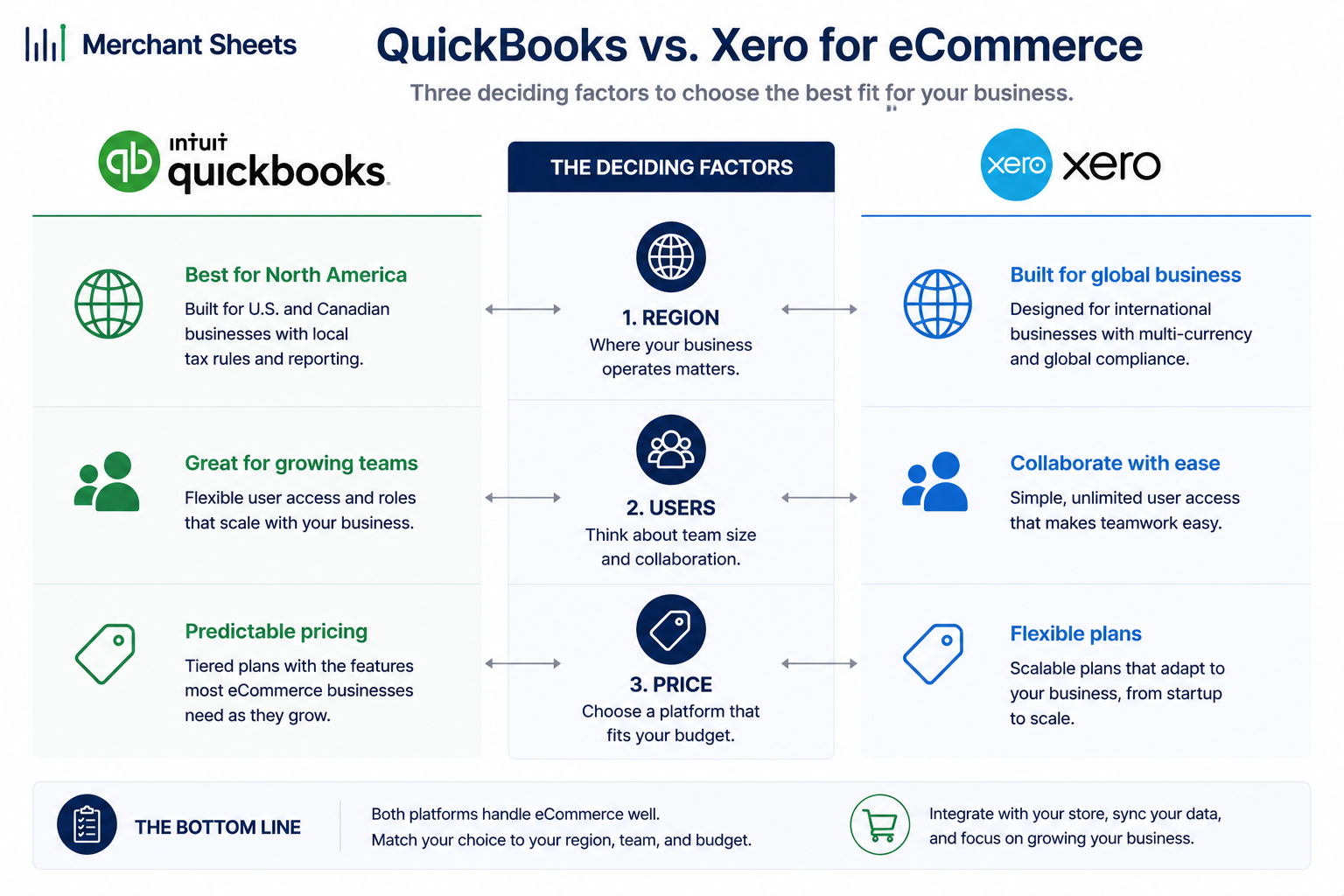
- QuickBooks Online and Xero are both strong ecommerce ledgers; for most sellers, the choice comes down to three things: where you sell, how many people need access, and the fact that you’ll run A2X in front of either one.
- Xero includes unlimited users on every plan; QuickBooks caps users at 1, 3, 5, and 25 by tier, which is the most common reason a growing brand with a team picks Xero.
- On list pricing as of August 2026, QuickBooks runs about $38 to $275 a month across its main plans and Xero about $25 to $90; a five-seat team pays roughly $720 a year more on QuickBooks Plus than on Xero Growing.
- Neither platform reconciles Shopify or Amazon payouts well on its own, so you add A2X in front of either ledger to split out platform fees, COGS, and sales tax, after which the two are close to equivalent for the bookkeeping.
- QuickBooks has native inventory on Plus and up and native US sales tax; Xero has a cleaner interface, unlimited users, and stronger multicurrency, and leans on Avalara for sales tax.
- Above roughly $1M in sales or with real SKU complexity, both ledgers get a dedicated inventory app in front of them, and around $10M or with multiple entities, brands tend to outgrow both.
QuickBooks Online and Xero are the two ledgers most ecommerce brands choose between, and both are good. The feature checklists that dominate this comparison mostly miss the point. For an online seller, the decision comes down to a few things, and one of them settles it more often than any single feature.
QuickBooks vs Xero overview
For most ecommerce sellers, QuickBooks Online is the stronger fit in the US, with native inventory, native sales tax, and a larger network of accountants who know it, while Xero wins on price and unlimited users. Both handle online sales well once you add A2X, so the choice usually comes down to team size, region, and budget.
The decision runs on several questions.
Where do you sell? QuickBooks is the default in the US and Canada; Xero leads in Australia, New Zealand, and the UK.
How many people need to be in the books? That’s the seat question, and it’s the one that decides it most often. And what’s your budget? Xero is cheaper at almost every comparable tier.
Which platform is “better for ecommerce.” Both need the same helper to handle Shopify and Amazon cleanly, so the raw ecommerce data handling is close to a wash. Keep that in mind as you read the feature sections; the differences are real, but they rarely override users, price, and region.
If you want the wider picture first, start with the foundations of ecommerce accounting, then come back here to pick the tool.
QuickBooks Online vs Xero at a glance
| Factor | QuickBooks Online | Xero |
| Users included | 1 to 25 by plan (1 / 3 / 5 / 25) | Unlimited on every plan |
| Native inventory | Yes, on Plus and Advanced | Basic only |
| US sales tax | Native, automated | Through Avalara (add-on) |
| Multicurrency | From Essentials up | From Established, and stronger |
| Strongest region | US and Canada | Australia, New Zealand, UK |
| Shopify and Amazon data | A2X in front of the ledger | A2X in front of the ledger |
QuickBooks vs Xero pricing (2026)
Price is where a lot of sellers start, so here are the plans side by side. The figures below are list rates from each platform’s own pricing page as of August 2026. QuickBooks raised its prices in 2026, and both platforms change rates and plan names often, so treat these as a snapshot and check the current pricing pages before you commit.
The pattern is consistent: Xero costs less at every comparable tier, and the gap widens as you add people. A five-person team is the clearest example. On QuickBooks that means the Plus plan at about $1,380 a year; on Xero it’s the Growing plan at about $660. Same books, different bill.
What moves you up the tiers is scale and access more than ecommerce features. On QuickBooks, inventory and project tracking start at Plus and multicurrency at Essentials; there’s also a $20 Solopreneur plan, but it’s too thin for a real product business.
On Xero, the entry Early plan caps you at 20 invoices a month, so most sellers start on Growing.
Match the plan to your seat count and invoice volume first, then check which features you need.
QuickBooks Online plans (list price, as of August 2026)
| Plan | Monthly | Users | Notes |
| Simple Start | $38 | 1 | Sales tax; no inventory |
| Essentials | $75 | 3 | Adds multicurrency and time tracking |
| Plus | $115 | 5 | First tier with inventory and COGS |
| Advanced | $275 | 25 | Advanced reporting and automation |
Xero US plans (list price, as of August 2026)
| Plan | Monthly | Users | Notes |
| Early | $25 | Unlimited | Capped at 20 invoices and 5 bills a month |
| Growing | $55 | Unlimited | Unlimited invoicing and bills |
| Established | $90 | Unlimited | Adds multicurrency and analytics |
What you’ll add on top
The sticker price isn’t the whole cost. An ecommerce accounting stack needs a few pieces on top of either ledger, and they cost about the same whichever one you pick, so they don’t tilt the decision, but you should budget for them.
- A2X or a similar tool: Maps Shopify and Amazon payouts into clean entries, roughly $19 to $49 a month by order volume. Plan on it with either platform.
- An inventory app: Once you pass a simple catalog, Inventory Planner, Cin7, or a similar app becomes the source of truth for stock and COGS, from around $99 a month.
- Sales tax software: For multi-state nexus, Avalara or TaxJar handles registrations and filings on top of either ledger.
- Payroll: Neither platform includes US payroll in these plans, so a service like Gusto adds around $40 a month plus a per-employee fee.
The difference that usually decides it: user seats
Here’s the factor that settles most ecommerce comparisons. Xero includes unlimited users on every plan, with no per-user fee. QuickBooks caps users by tier: one on Simple Start, three on Essentials, five on Plus, and twenty-five on Advanced. Add one more person than your plan allows and you don’t pay a small seat fee, you jump to the next tier.
For an ecommerce business that adds up fast. A typical growing brand has an operator in the books, a bookkeeper, and a fractional CFO, and often an ops or warehouse lead who needs at least view access.
That’s four or five seats before you’ve counted a co-founder. On QuickBooks, the seat after five means moving from Plus to Advanced, which is a large jump in monthly cost. On Xero, everyone’s in for the same price.
This is the most common reason growing ecommerce brands move from QuickBooks to Xero, and it’s a real recurring cost difference rather than a feature preference. If more than a couple of people will ever touch your books, weight it heavily.
How each handles your Shopify and Amazon data
This is the point that reframes the whole comparison. Neither QuickBooks nor Xero turns a Shopify or Amazon payout into clean books on its own. A marketplace payout is a lump of sales, refunds, platform fees, shipping, and sales tax netted into a single deposit. Drop that deposit straight into either ledger as one line and your revenue, margin, and COGS are wrong from the start.
The fix is the same on both platforms: you run A2X, a tool that sits in front of the ledger and maps each payout into a proper journal entry, with revenue, fees, COGS, and tax split out and reconciled to the exact deposit that hit your bank. It’s the same job whether the ledger underneath is QuickBooks or Xero.
This is closely tied to reconciling Amazon settlements, where the timing between a sale and its payout is what trips up your books, and to why accrual accounting matters for an inventory business.
A single Amazon settlement makes the point. A $10,000 payout might be $14,000 of sales, minus $3,000 of Amazon fees and $1,000 of refunds, with sales tax and shipping woven through. A2X posts that as one entry with each piece on its own line, so your revenue and margin are right and the entry ties out to the deposit.
Link My Books does the same job, and either works with both ledgers. So the real choice is which ledger those clean entries land in; the ecommerce capability is the same on both.
The consequence is the headline of this guide: once A2X is in front of it, QuickBooks and Xero are close to equivalent for the ecommerce bookkeeping itself. That’s why the decision should rest on users, price, and region rather than on which platform is “better for ecommerce.”
QuickBooks does offer a native Shopify connector, but most ecommerce accountants use the A2X approach because it keeps fees and COGS accurate, and it works the same on either ledger.
Inventory and COGS
Here’s a feature gap that’s genuinely real, with limits worth understanding. QuickBooks has native inventory tracking on its Plus and Advanced plans: it tracks stock on hand, values it, and posts COGS at the SKU level as you sell. For a small, simple catalog that’s useful out of the box, and it’s one reason US product sellers lean toward QuickBooks. Xero’s built-in inventory is basic by comparison.
QuickBooks values stock on a first-in, first-out basis and updates COGS automatically as orders ship, while Xero tracks quantities and a set cost per item without the same automated costing.
Scope it correctly, though. Above roughly $1M in sales, or once you’re dealing with kitting, bundles, purchase-order planning, or multi-warehouse stock, both ledgers get a dedicated inventory app such as Inventory Planner or Cin7 in front of them, and that app becomes the source of truth for stock and COGS.
At that point the native-inventory difference mostly disappears, because neither platform’s built-in module is doing the heavy lifting.
So the inventory edge is real for smaller, simpler catalogs and fades as you scale. Whichever platform you land on, the inventory costing method behind those numbers and how you record COGS work the same way; the ledger is where the entry lands.
Sales tax
QuickBooks has a modest, US-flavored edge here. Its automated sales tax calculates rates by customer address and tracks what you owe as you sell, which is convenient for US sellers with light multi-state exposure. Xero handles sales tax through Avalara, a paid add-on, rather than a built-in engine.
Keep the edge in proportion. For a seller with light nexus, QuickBooks’ built-in handling saves a step. For heavy multi-state nexus, both platforms lean on a dedicated tax tool like Avalara or TaxJar to manage registrations and filings, so the gap narrows to almost nothing at scale.
Sales tax nexus is its own project once you cross thresholds in several states, and it’s worth setting up properly whichever ledger you run. Either way, keep registration and remittance off guesswork; it’s the area where ecommerce sellers most often fall behind.
Multicurrency and selling internationally
This is where Xero has the clear edge. Its multicurrency is included on the Established plan and is widely regarded as cleaner and more capable, handling foreign-currency invoices, bank accounts, and automatic revaluation smoothly.
QuickBooks offers multicurrency from Essentials up, but its automatic conversion is weaker in practice. Xero also handles foreign bank accounts and the gains or losses from currency movement with less manual cleanup at month-end.
If you sell into multiple countries or hold balances in more than one currency, Xero is the more comfortable home, and it’s stronger in international markets generally. If you sell US-only, this section doesn’t change your decision, so move on to the factors that do.
Ecosystem, ease of use, and finding help
A few practical factors get overlooked in feature comparisons and matter more than they look. QuickBooks is the US default: it has the largest US app ecosystem and it’s the platform the most US bookkeepers and accountants know cold. When you hire help or hand off the books, that fluency is worth real money and saved time.
Xero counters with a cleaner, more approachable interface that non-accountants find easier to navigate, plus the unlimited-users model, and it leads in Australia, New Zealand, and the UK. Its US app ecosystem is smaller than QuickBooks’ but covers the tools ecommerce brands rely on.
On the fundamentals the two are close: both offer direct bank feeds, rule-based reconciliation, and solid standard reports. QuickBooks leans toward deeper, more customizable reporting and heavier automation on its higher tiers, which larger or more complex brands make use of.
Xero’s reporting is clean and steadily improving, and its bank reconciliation flow is a long-standing favorite for day-to-day bookkeeping.
The practical takeaway: Your accountant’s or bookkeeper’s fluency in a platform is a real input to this decision. Running the ledger your finance help knows best often beats a marginally better feature you’ll rarely touch.
Where each platform breaks at scale
Both platforms have a ceiling, and it’s worth knowing before you pick. QuickBooks and Xero are built for single-entity businesses.
Once you’re running multiple legal entities, consolidating across them, or clearing roughly $10M in sales with complex inter-company activity, many brands typically graduate to a mid-market system like NetSuite for multi-entity consolidation and eliminations.
That’s a milestone, not a warning. Either platform will serve you well for years before you reach it, and the move to a bigger system is a sign the business has grown into it.
Which should you choose?
Put the three questions together, region, seats, and budget, and a clear pick falls out for most sellers. The table below maps the common ecommerce profiles to a recommendation. In every case the assumption is that you’re running A2X in front of the ledger, because that’s what makes the books accurate on either one.
If your situation falls between two rows, let the deciding question break the tie: seats and budget point to Xero, while native inventory, native US sales tax, and easy access to an accountant who knows the platform point to QuickBooks.
Which to choose, by seller profile
| Seller profile | Pick | Why |
| US Shopify or DTC brand, single entity, small team | QuickBooks Plus + A2X | Native inventory and sales tax, and the most US accountants know it |
| Cost-sensitive, or 5+ people need access, any region | Xero Growing + A2X | Unlimited users and a lower monthly cost for the same books |
| Selling internationally or holding multiple currencies | Xero Established + A2X | Stronger, included multicurrency and international support |
| Running multiple entities | Either now; plan to move up later | Both strain at multi-entity scale, so you will graduate to a larger system |
Frequently asked questions
Is Xero or QuickBooks better for Shopify?
Both run a Shopify store’s books well once you add A2X to map payouts into clean journal entries, so neither is clearly better for Shopify on the accounting itself. QuickBooks edges ahead for US sellers who want native inventory and sales tax, while Xero wins on price and unlimited users.
Is Xero cheaper than QuickBooks?
Yes, Xero is cheaper than QuickBooks at almost every comparable tier, and the gap widens as you add users because Xero includes unlimited users while QuickBooks charges more for higher-seat plans. As of August 2026, a five-person team pays roughly $720 a year less on Xero Growing than on QuickBooks Plus.
Can QuickBooks and Xero handle Amazon sales?
Yes, both handle Amazon sales well when you add A2X, which turns each Amazon settlement into a journal entry that splits out fees, COGS, refunds, and sales tax and reconciles to the payout. Without a tool like A2X, neither platform records Amazon payouts accurately on its own.
Do I need A2X with QuickBooks or Xero?
You need A2X, or a comparable tool like Link My Books, on either platform if you sell on Shopify or Amazon and want accurate revenue, fees, and COGS, because marketplace payouts are netted deposits that a ledger can’t break apart by itself. It’s the piece that makes the two platforms roughly equivalent for ecommerce.
Can I switch from QuickBooks to Xero?
Yes, you can switch from QuickBooks to Xero, and conversion tools and accountants move your data and history across, though it’s a real project best timed to the start of a fiscal period. Most brands switch for the unlimited users or the lower cost, not the features.
Which do accountants prefer?
It depends on the market: US accountants and bookkeepers more often know QuickBooks, while Xero is the default in Australia, New Zealand, and the UK and is popular with cloud-first firms everywhere. Your own accountant’s fluency is a fair reason to pick one.
Get help picking the right platform
Still weighing it, or you’d rather not run the setup and the monthly close yourself? I’m a QuickBooks Online ProAdvisor and a Xero partner, so I’m not here to sell you on a platform.
I’ll set up and run your books in whichever one fits how you sell, and if you’re on the wrong one for your brand, I’ll tell you.
Book a discovery call and we’ll pick the right fit.
