
Key takeaways
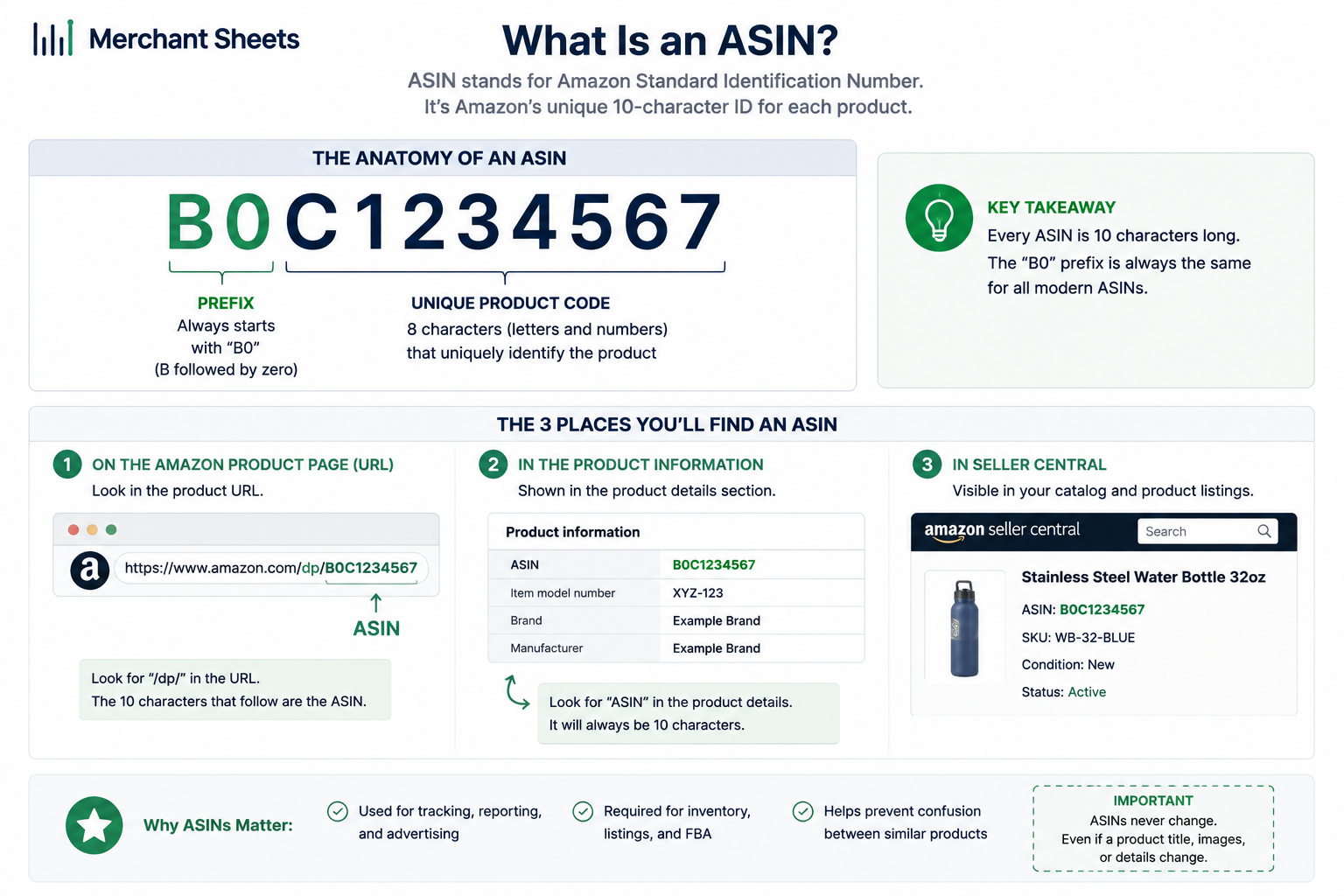
- An ASIN (Amazon Standard Identification Number) is the unique 10-character alphanumeric code Amazon assigns to every product in its catalog.
- Most ASINs start with “B0”; books are the exception and use their 10-digit ISBN as the ASIN.
- Amazon creates the ASIN automatically, one per product, and every seller offering that product shares the same ASIN.
- An ASIN is Amazon’s catalog ID; a SKU is your own internal code, a UPC is the manufacturer barcode used across all retail, and an FNSKU labels your FBA units.
- You’ll find an ASIN in the product URL after /dp/, in the product information section, or in Seller Central, and creating a new one usually needs a GS1 UPC unless you have a GTIN exemption.
Open Seller Central, a listing page, or a settlement report and the word ASIN is everywhere. It’s the 10-character code Amazon uses to name every product in its catalog, and it quietly runs how your listings, inventory, and payouts connect. Here’s what it is and why it matters for your numbers.
What is an ASIN?
An ASIN (Amazon Standard Identification Number) is a unique 10-character alphanumeric code Amazon assigns to every product in its catalog. It identifies the product page rather than the seller, so every merchant offering the same item shares one ASIN.
Amazon generates it automatically the first time a product enters the catalog.
That last point sometimes trips people up. You don’t create your ASIN or pick its characters, and you don’t own it. If ten sellers list the same stainless steel water bottle, all ten sit on a single ASIN, competing for the same buy box on one shared page.
The ASIN belongs to the catalog entry, and your job is to attach your offer and your own SKU to it.
What does an ASIN look like?
An ASIN is 10 characters of letters and numbers, and most begin with “B0”, like B07FZ8S74R. Books are the one common exception: their ASIN is the 10-digit ISBN, so a book’s code can be all numbers, like 0451524934.
One detail worth knowing early is that an ASIN is tied to a single marketplace. The same product can carry one ASIN on Amazon US and a different one on Amazon UK or Germany, so if you sell across regions, expect a separate ASIN in each catalog rather than one code everywhere.
How do you find an ASIN?
For any live listing, the ASIN is never more than a few clicks away. Three reliable places to look:
- The product URL: It’s the 10-character code right after /dp/ in the web address, as in amazon.com/dp/B07FZ8S74R.
- The product information section: Scroll partway down a listing to the product details, where the ASIN sits alongside dimensions and weight.
- Seller Central: Open Manage Inventory and the ASIN shows under each product name, next to your own SKU.
ASIN vs SKU, UPC, and FNSKU
Four identifiers follow a product around Amazon, and sellers blur them constantly. The quickest way to keep them straight is by who assigns each one and what it names.
The four product identifiers on Amazon, and who owns each
| Identifier | Who assigns it | What it identifies | Seller controls it? | Where it’s used |
| ASIN | Amazon | The catalog product page | No | Everywhere on Amazon |
| SKU | You, the seller | Your own stock unit for that offer | Yes | Your inventory and books |
| UPC / EAN (GTIN) | GS1 (manufacturer) | The physical product, across all retail | Yes (you buy it) | Any store, not only Amazon |
| FNSKU | Amazon | Your specific FBA units in the warehouse | No | FBA fulfillment and labeling |
How do you get an ASIN for a new product?
You get a new ASIN by creating a listing for a product that isn’t in Amazon’s catalog yet. When the page goes live, Amazon assigns the ASIN. If the product already exists, you don’t make a new one; you list your offer against the ASIN that’s already there.
For most branded and private-label products, Amazon requires a valid GS1 UPC or EAN, a type of GTIN (Global Trade Item Number), to create that new page as of 2026. Buying cheap barcodes that don’t trace back to GS1 is a common shortcut that leads to listing errors and takedowns, so source them from GS1 directly.
Some products qualify for a GTIN exemption, which lets you list without a barcode, and it’s common for handmade goods, bundles, and unbranded items. Selling your own brand also means enrolling in Brand Registry, which gives you more control over how your listings and ASINs behave.
Parent and child ASINs
Some products come in variations, and Amazon handles those with a parent-child structure. A parent ASIN is a grouping that customers can’t buy directly; the child ASINs underneath it are the versions they buy, each a different size, color, flavor, or pack count.
Grouping variations this way pools reviews and sales history across the family onto one product page, which tends to help ranking and click-through. Amazon allows a large number of children under a single parent (up to 2,000 as of 2026, though most families run far smaller).
The catch shows up when you look at the money: profitability doesn’t roll up to the parent on its own, which is where the next section comes in.
Why your ASIN matters for your numbers
The ASIN is the identifier your money ties to. Amazon reports sales, fees, ad spend, and returns by ASIN, while your books and inventory run on your SKUs, so reconciling the two is how you learn your real FBA margin per product after Amazon takes its cut.
Get that mapping right and the ASIN becomes the thread that connects a payout back to a specific unit in your accounting, and ultimately to your Amazon FBA profitability.
Two friction points make this harder than it sounds. First, Amazon’s FBA fees and surcharges attach at the unit and FNSKU level, so the same parent’s children can carry different costs.
Second, there’s no native way to aggregate profit, ad spend, and returns up to a parent ASIN; each child is its own revenue line, which leaves the question “which product family is profitable?” unanswered in Seller Central.
Closing that gap means matching ASIN-level payouts to your SKU records and rolling a variation family up to a single profit number, which is the same work behind clean ecommerce accounting and the ecommerce KPIs you track each month.
| One product, one ASIN, shared by every seller. Your SKU is yours; Amazon’s ASIN belongs to the catalog. Reconciling the two is where your profit picture comes from. |
Turn ASIN-level data into a profit picture
Amazon reports your sales, fees, and returns by ASIN, and your books run on your SKUs, so the two never line up on their own. The Multi-Channel Reconciliation template matches them for you, so every ASIN-level payout lands against the right product and a variation family rolls up to one profit number you can trust.
Frequently asked questions
What does ASIN stand for?
ASIN stands for Amazon Standard Identification Number, the unique 10-character code Amazon assigns to every product in its catalog to identify the listing page.
How do I find the ASIN for a product?
You’ll find the ASIN in the product URL right after /dp/, in the product information section partway down the listing, or in Seller Central under Manage Inventory. All three show the same 10-character code for that product.
Is an ASIN the same as a SKU?
No, an ASIN is Amazon’s catalog ID for a product and is shared by every seller offering it, while a SKU is your own internal stock code that you assign and control. Amazon owns the ASIN; you own the SKU.
Do I need a UPC to get an ASIN?
Usually yes: to create a new listing (and the ASIN that comes with it) Amazon requires a valid GS1 UPC or EAN for most branded products, unless you qualify for a GTIN exemption for handmade, bundled, or unbranded goods.
Can two products have the same ASIN?
No, each product has exactly one ASIN, and every seller of that product shares it, so two genuinely different products shouldn’t share a code. Duplicate ASINs for the same item violate Amazon policy and get merged or removed.
Can an ASIN be changed or deleted?
You can’t change an ASIN’s code, because Amazon controls it and it stays fixed to the catalog entry for the life of that product. You can close or delete your own listing against it, but the ASIN itself remains in Amazon’s catalog.
