
Key takeaways
- The month-end close is the repeatable process of finalizing one month’s books so the numbers are complete, reconciled, and locked, and for an ecommerce business, the marketplace payouts decide when you can start and finish.
- The close runs in a fixed sequence: reconcile cash and every sales channel first, then cut off inventory and COGS, then post accruals, then review, then lock, because each step depends on the one before it.
- You reconcile each channel to its payout or settlement report, not to your bank deposits, because a marketplace deposit arrives net of fees and on a lag.
- A realistic target for a small ecommerce business is a close finished within about five to ten business days of month-end, and the ceiling is set by how fast your last settlement posts.
- A soft close gives you fast preliminary numbers; the hard close comes after the final settlements land, when you lock the period so the numbers can’t shift under you.
- The way to make the close faster is to make it repeatable: a fixed close calendar, an owner for each step, and the recurring entries built once and run every month.
Month-end lands and half your money is still in transit: an Amazon settlement that hasn’t posted, a Shopify payout mid-cycle, fees you can’t see yet. The month-end close is how you turn that into one finished, locked set of numbers, and for an ecommerce business, the order you work in is what makes it possible.
What is the month-end close, and why is it different for ecommerce?
The month-end close is the process of finalizing a month’s books: recording every transaction, reconciling every account, posting the adjustments, and locking the period so the financials are final. For an ecommerce business, it’s harder because your sales run through channels and processors that report on their own schedule, so the close waits on settlements.
In a simple business, the close is mostly reconciling the bank and posting a few accruals. An ecommerce close has more moving parts and a stricter order: revenue and cash arrive separately, a marketplace pays you net of fees and on a lag, you carry inventory that has to be cut off, and prepaid orders sit as a liability until you ship.
The close sequence: run these five phases in order
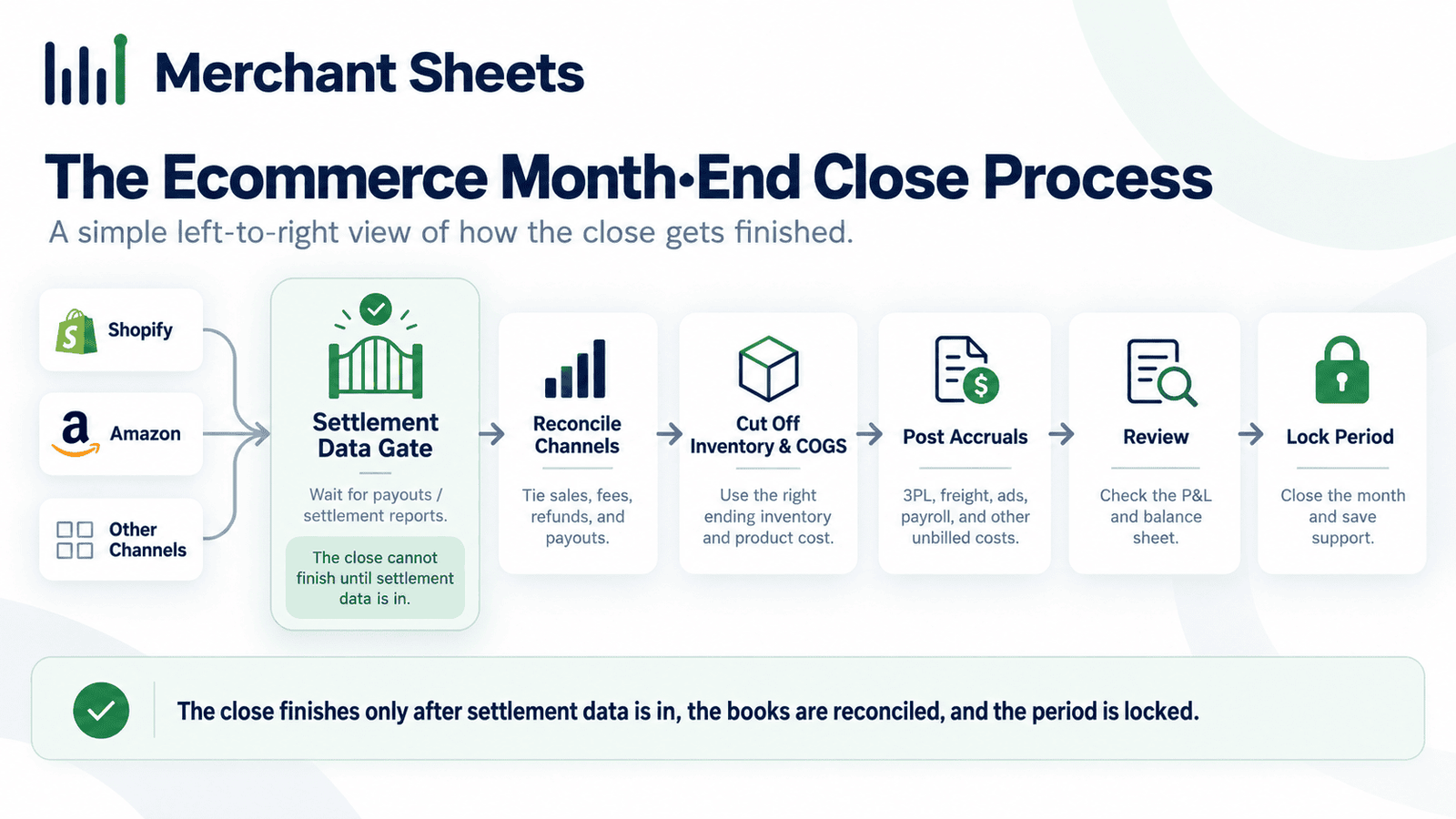
An ecommerce close runs in five phases, and the order isn’t optional: reconcile cash and channels, cut off inventory and COGS, post accruals and deferrals, review and analyze, then lock. Each phase depends on the one before it, so working out of order means doing it twice.
You can’t trust cost of goods until sales are reconciled; you can’t accrue against revenue until revenue is final, and you can’t review or lock until everything is posted. Run the phases in order, and each one hands clean numbers to the next.
Table 1. The ecommerce month-end close, phase by phase.
| Phase | What you do | Why it has to come here |
| 1. Reconcile cash and channels | Tie your bank and each sales channel to its payout or settlement report | Nothing downstream is trustworthy until the money is tied out |
| 2. Cut off inventory and COGS | Roll inventory and record the cost of goods for the units shipped in the month | Needs channel sales finalized so units and revenue match |
| 3. Post accruals and deferrals | Record deferred revenue, ad spend, sales tax, and other accruals in the period | Needs reconciled revenue and cost to accrue against |
| 4. Review and analyze | Review the balance sheet and run variance against the prior month, then fix anomalies | Needs every entry posted so the statements are complete |
| 5. Lock the period | Lock the month so the numbers can’t change, then publish the statements | Done only once the review is clean |
Phase 1: reconcile cash and every channel first
The close starts with reconciliation, and for ecommerce that means tying your bank and each sales channel to its own payout or settlement report, not to the deposits that hit your bank. A marketplace pays you net of fees, on a lag, so the deposit and the sale never match on their own.
Shopify Payments, Amazon settlements, and PayPal each settle on their own timing, and you reconcile the gross sale, the fees, and the payout so the difference between what you sold and what landed is explained rather than lost.
Two things shape the rest of the close here: an Amazon settlement often straddles month-end, so you split it by settlement date, and the close can’t finish until the last settlement for the month has posted.
That’s the gate. The channel-by-channel mechanics are their own walkthrough in multi-channel reconciliation, and mapping each payout to the sale, fees, and taxes automatically is the job of a tool like A2X.
The clean way to handle the timing gap is a clearing account. You record the gross sale as revenue when it’s earned, route the expected payout through a holding or clearing account, then clear that account when the deposit lands, so the fees, the refunds, and the lag all show up as reconciling items instead of disappearing into a net figure.
When the clearing account is back to zero, that channel is reconciled for the month. It’s also why you never book a marketplace deposit straight to sales: that buries the fees and leaves you tying out to a number that was never your real top line.
Phases 2 and 3: cut off inventory, COGS, and the accruals
Once sales are reconciled, you cut off inventory and cost of goods sold (COGS), then post the accruals, so the month carries the cost of what it shipped and the revenue it earned. Cut-off means each unit’s cost lands in the month it shipped; an accrual puts a cost or a deferral in the right period even when the cash moves later.
In practice, a unit that shipped on the 31st belongs to that month’s cost of goods even if the platform reports it on the 1st, and an ad invoice that arrives on the 5th for last month’s spend gets accrued back to the month those ads drove the sales.
These are the entries a generic corporate close skips:
- Inventory and COGS cut-off: Record the cost of the units shipped in the month and roll inventory to match, so margin is real; the cost math itself is how to calculate COGS.
- Deferred revenue: Recognize prepaid subscriptions, pre-orders, and gift cards as revenue only as you ship or deliver against them, releasing the liability a piece at a time; the full mechanics are in deferred revenue.
- Ad spend and platform fees: Accrue the spend and fees that belong to the month even when the invoice or payout settles later, so contribution isn’t overstated.
- Sales tax collected: Book the tax you collected as a liability rather than revenue and set it aside to file, and where it applies is sales tax nexus.
Phases 4 and 5: review, then lock the period
With every entry posted, you review before you lock: run the balance sheet and a variance against the prior month, chase anything that looks off, then lock the period so the numbers can’t move. A soft close gives you fast preliminary numbers a few days in; the hard close comes once the last settlement has posted and everything ties.
Variance review is where errors surface: a margin that jumped, a fee line that doubled, revenue that doesn’t match reconciled payouts, each is a thread to pull before the month is locked.
Once it ties, you set a lock or closing date in QuickBooks or Xero so nobody posts into the closed month by accident, and you publish the statements. What those statements say, and how to read them, is its own walkthrough in the financial statements.
A handful of balance-sheet accounts are where an ecommerce close quietly goes wrong, so check each one before you lock: inventory should tie to a count or your inventory system, deferred revenue should equal the orders you still owe, sales tax payable should match what you collected, and every payout clearing account should be back to zero.
If one of those doesn’t tie, the month isn’t done, no matter how clean the income statement looks.
How long should an ecommerce close take?
A small ecommerce business should aim to close within about five to ten business days of month-end, and the ceiling is set by your slowest settlement, not by how fast you do the bookkeeping. That reconciliation gate is why an ecommerce close runs a little longer than a cash-only business’s; you can’t finish until the last payout posts.
Whether you land at five days or ten comes down to how many channels you sell on and how much of the reconciliation is automated: one Shopify payout reconciles fast, while several marketplaces with staggered settlements and manual spreadsheets push you toward the longer end.
The calendar below is illustrative, and the real dates shift with when your settlements land.
Table 2. A realistic month-end close calendar for a small ecommerce business (illustrative; your dates shift with when your settlements post).
| When | What happens | What it waits on |
| Days 1 to 2 | Import all channel and processor data, and reconcile cash and the channels whose payouts have posted | Shopify and processor payouts posting |
| Days 3 to 5 | Finish channel reconciliation as the last settlements land, and cut off inventory and COGS | The final Amazon settlement that straddles month-end |
| Days 4 to 6 | Post the accruals: deferred revenue, ad spend, and sales tax | Reconciled revenue and cost as the base |
| Days 6 to 8 | Review the balance sheet, run variance against last month, and fix anomalies | Every entry being posted |
| Days 8 to 10 | Lock the period and publish the statements | A clean review |
Turn the close into a repeatable routine
The difference between a close that drags and one that’s boring is repeatability: a fixed calendar, an owner for each step, and the recurring entries built once so every month runs the same way. Here’s how to get there:
- Set a close calendar: Pick your target close day and put each phase on a dated schedule, working backward from when your last settlement usually posts.
- Give every step an owner: Name who reconciles, who posts accruals, and who reviews, even if it’s one person wearing three hats, so nothing falls between roles.
- Build the recurring entries once: Set deferred revenue, ad-spend, and depreciation accruals up as recurring journal entries so they run every month instead of being rebuilt.
- Automate the reconciliation feed: Use a tool that maps each payout to sales, fees, and taxes, so reconciliation starts from clean data instead of a spreadsheet.
- Run a soft close early: Produce preliminary numbers a few days in, then finalize once the last settlement posts, so you’re not waiting on the whole month to see anything.
- Lock every month and watch the trend: Close the period, then track the close itself month over month, how long it took and what broke, and fix the recurring snags.
Frequently asked questions
What are the steps in the month-end close process?
The month-end close runs in five steps: reconcile cash and every sales channel, cut off inventory and cost of goods, post accruals and deferred revenue, review the statements against the prior month, then lock the period, in that order because each step depends on the one before it.
What is the right order to close the books each month?
Reconciliation comes first, then the inventory and COGS cut-off, then accruals, then review, then locking the period, because you can’t trust cost until sales are reconciled and you can’t review or lock until every entry is posted.
When can you start and finish the close for an ecommerce business?
You can start reconciling as soon as the first payouts post, but you can’t finish until the last settlement for the month lands, which is why an ecommerce close is gated by settlement timing rather than by the calendar.
Why does an ecommerce close take longer than a regular one?
An ecommerce close takes longer because revenue and cash arrive separately: a marketplace pays you net of fees and on a lag, settlements straddle month-end, and you carry inventory to cut off, so there are more moving parts and a hard dependency on outside reports.
How do you close the books in QuickBooks or Xero?
You reconcile the accounts, post the month’s adjusting and recurring entries, review the statements, then set a closing or lock date so nobody can post into the closed period, which is how both QuickBooks and Xero lock a month.
What is a month-end close calendar?
A close calendar is a dated schedule that puts each phase of the close on a specific business day, worked backward from when your settlements post, so the close runs the same way and finishes on time every month.
Can the month-end close be automated?
Parts of it can: importing and mapping payouts, recurring accruals, and reconciliation feeds all automate well, but the review and the judgment calls on anomalies stay manual, so automation makes the close faster and more consistent rather than hands-off.
What's the difference between the month-end close and the year-end close?
The month-end close finalizes one month’s books for management reporting, while the year-end close adds tax and audit work and final adjustments; running a clean month-end close all year makes the year-end close far smaller.
