
Key takeaways
- Amazon seller bookkeeping means keeping books that split each settlement into product sales, the fee stack, and refunds, so revenue and margin read correctly.
- Amazon pays out one figure every two weeks, net of referral and FBA fees, advertising, refunds, and a held reserve, so the amount in your bank isn’t your revenue.
- Amazon is a marketplace facilitator, so it collects and remits sales tax for you in every state that has one; the collected tax is a pass-through, not income, and you can still owe registration or filings in some states.
- Brands that hold inventory should keep the books on accrual, so product sales and the cost of goods sold land in the same month.
- A settlement connector like A2X posts each Amazon settlement into QuickBooks or Xero split by sales, fees, and refunds, which is what makes the books tie.
- Set up the chart of accounts, connect the software, book FBA landed-cost COGS, and reconcile every settlement, and the monthly close becomes routine.
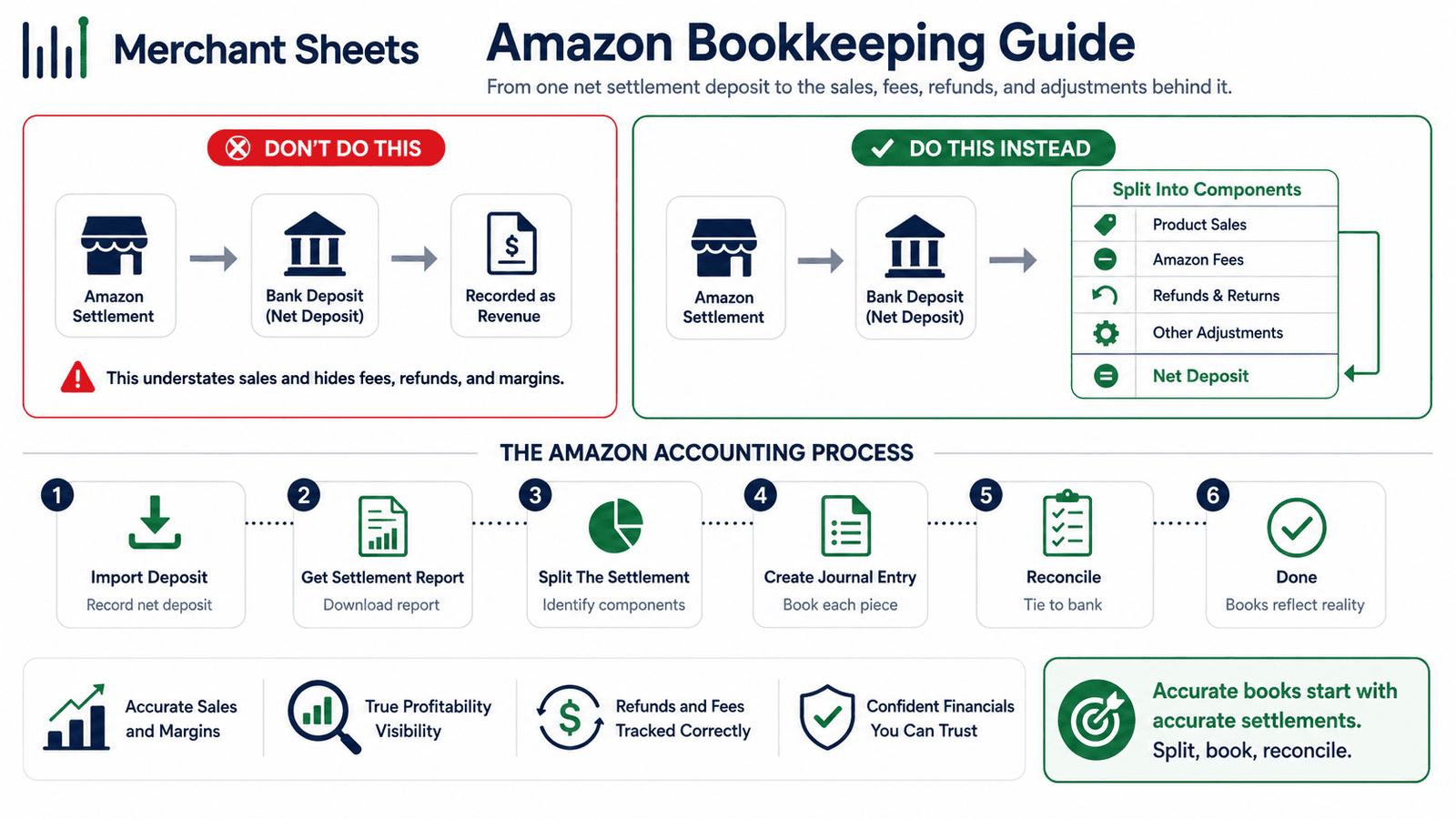
Amazon drops one number into your bank every two weeks, already net of a dozen fees, refunds, and a chunk it holds back. Book that number as revenue and your sales and your margin are both wrong from day one. Amazon accounting is about splitting each settlement back into the sales, fees, and refunds behind it.
What is Amazon seller bookkeeping?
Amazon seller bookkeeping is the practice of recording your Amazon product sales, fees, refunds, inventory, and tax so your financial statements are accurate.
It goes past a simple bank feed because Amazon deposits your sales net of a stack of fees, so the books have to split each settlement back into gross product sales, each fee, and any refunds before the numbers mean anything.
Amazon runs the marketplace, the checkout, and the payout, and Seller Central gives you order and settlement reports, but it isn’t your accounting system. Those reports tell you what sold and what Amazon paid out; they don’t produce a balance sheet, carry inventory as an asset, or book the cost of goods sold.
That work happens in QuickBooks or Xero, and the numbers have to flow in in a shape your P&L (profit and loss statement) and your accountant can use.
A settlement is the batched, roughly two-week payment Amazon sends to your bank, and the whole setup comes down to three things: a chart of accounts, a clean connection to your software, and a way to handle those settlements.
It all sits inside the wider job of ecommerce bookkeeping, covered end to end in the complete ecommerce bookkeeping guide.
Why your Amazon payout isn’t your revenue
Amazon groups roughly two weeks of orders into a settlement, subtracts its referral fees, FBA fulfillment fees, storage, advertising, and any refunds, holds back a reserve, then deposits the net into your bank. The bank feed shows one clean number that’s a lot smaller than what your customers paid. Say a settlement covers $20,000 in product sales.
Take out about $3,000 in referral fees, $2,000 in FBA fees, and $500 in refunds, hold back a $1,000 reserve, and roughly $13,500 lands in your account. Book that $13,500 as revenue and you’ve lost $6,500 of sales and buried every fee in a single entry.
That gap is why Amazon books drift. Revenue reads low, the fees never show up as expenses, and gross margin looks healthier than it is, so every downstream call on pricing and ad spend runs on soft numbers.
The fix is to record gross product sales as income, each fee as an expense, and refunds as a reduction of sales, so every settlement ties back to what happened order by order.
Amazon adds two wrinkles a card processor doesn’t. Settlements run on a fixed schedule, so one can straddle a month end, and at close you match it by the settlement’s own period rather than the deposit date. And the reserve holds part of what you’ve earned, so a slice of each period’s sales lands in your bank a cycle or two later.
The settlement report, not the bank deposit, is the source of truth for revenue. Here’s what every settlement is made of.
Table 1. What an Amazon settlement contains, and where each piece goes in the books.
| Settlement line | What it is | Where it goes in the books |
| Product sales | The full order value customers paid | Revenue (income) |
| Referral fees | Amazon’s commission on each sale | An expense (referral fees) |
| FBA fulfillment fees | The per-unit pick, pack, and ship charge | An expense (FBA fees) |
| Storage fees | Monthly and aged inventory storage | An expense (storage fees) |
| Advertising | Sponsored-product ad spend | An expense (advertising) |
| Refunds | Money returned to customers in the period | A reduction of sales (contra-revenue) |
| Reserve (held) | Funds Amazon holds back this cycle | A held balance (Amazon reserve) |
| Net disbursement | What lands in your bank | The bank transaction you reconcile to |
| Your Amazon disbursement is one net figure: product sales minus a stack of fees and refunds, less a reserve Amazon holds back, across two weeks of orders. Book the deposit as revenue and both your sales and your margin are wrong. Revenue comes from the settlement report. |
The fees that come out of every settlement
Amazon’s fees are their own reason the books are hard, because several of them come out before you ever see the money. The referral fee is Amazon’s commission on each sale, usually 8% to 15% depending on the category and 15% in most, with a small per-item minimum.
The FBA fulfillment fee is a per-unit charge to pick, pack, and ship an order, and it scales with the size and weight of the item.
On top of those sit monthly storage fees, charged per cubic foot and higher in the fourth quarter, plus an aged-inventory surcharge on stock that lingers, advertising for anything you run on sponsored placements, a refund administration fee when you refund an order, and the flat monthly fee for a Professional selling plan.
Every one of these posts somewhere in your books, and most of them land as an expense against the gross sale, which is exactly why netting the disbursement hides them.
The figures move, so confirm your own before you model them: as of 2026, Amazon raised FBA fees by an average of about $0.08 per unit effective January 15, with no new fee types added. For the full, current schedule and how each charge is calculated, see the breakdown of Amazon’s FBA fees.
Table 2. The Amazon fee stack, what each fee is, and how it’s charged (2026; verify current rates).
| Fee | What it is | How it’s charged (2026, verify) |
| Referral fee | Amazon’s commission on each sale | About 8% to 15% by category (15% in most), per-item minimum |
| FBA fulfillment fee | Pick, pack, and ship a unit | Per unit by size and weight; about $0.08/unit average rise Jan 15, 2026 |
| Monthly storage fee | Space your inventory occupies | Per cubic foot; higher in Q4 (October to December) |
| Aged / long-term storage | Surcharge on slow-moving stock | Added per cubic foot on aged inventory |
| Advertising (PPC) | Sponsored-product ad spend | Pay per click, billed to the account |
| Refund administration fee | Amazon’s charge when you refund an order | Per refunded order |
| Professional selling plan | The seller subscription | Flat monthly fee |
Does Amazon collect and pay your sales tax?
Amazon is a marketplace facilitator, which means it calculates, collects, and remits sales tax on your Amazon orders for you in every state that has a sales tax.
That takes the single biggest piece of sales-tax work off your plate, and it’s the reverse of Shopify accounting, where registering, collecting, and remitting the tax stays your job. It doesn’t make sales tax disappear from your books or your obligations, though.
Two things still fall to you. The tax Amazon collects and remits flows through your account, so it posts as a pass-through, a liability that clears when Amazon remits it, and it never belongs in revenue or in your expenses; leave it in sales and your top line is inflated.
And holding FBA inventory in a state can create nexus, an obligation tied to your physical or economic presence there, so some states still expect a marketplace seller to be registered or to file a return even when Amazon handles the remittance.
The thresholds and how to track them are in sales tax nexus. Rules vary by state and change often, so treat this as general information rather than tax advice.
Cash or accrual for Amazon sellers?
Most Amazon brands that hold inventory should keep the books on accrual. Accrual accounting records revenue when the sale happens and the cost of goods sold in the same period, so each month’s profit reflects the sales and the stock that moved.
This matters more on Amazon than almost anywhere, because settlements straddle months and FBA inventory can sit in a warehouse for a long time before it sells.
Cash accounting, which records money only when it enters or leaves your bank, is simpler and fine for a very small, inventory-light seller, though it distorts margin the moment you buy stock in one month and sell it across the next few.
The method sets how the rest of the books behave, so make the call early: if you carry inventory, choose accrual. The full trade-off, with worked examples, is in cash vs accrual accounting.
Set up your Amazon chart of accounts
Your chart of accounts (COA) is the list of buckets every transaction lands in, and an Amazon business needs a handful of specific ones beyond the software defaults.
Alongside a gross product sales account and the usual operating expenses, you want a clearing account for Amazon, a reserve account for the funds Amazon holds back, separate expense lines for referral fees, FBA fees, and storage, plus advertising, refunds, cost of goods sold, inventory, and sales tax payable.
If you also sell on your own site or another marketplace, tag or class your Amazon sales from the start, so one chart of accounts can report profit by channel without a rebuild.
The clearing and reserve accounts are the pieces that make settlements reconcile, so set them up on purpose. Sales post to the clearing account as orders ship, the reserve account holds whatever Amazon is keeping back, and when the disbursement hits the bank it clears both accounts down, with the fees and refunds coming out along the way.
Get those two accounts right and every settlement has a clean home instead of a mystery deposit to force-match. The fuller build, with account numbers and channel tags, is in the ecommerce chart of accounts. A starter set looks like this.
Table 3. A starter Amazon chart of accounts.
| Account | Type | What it captures |
| Product sales – Amazon | Income | Gross product sales through Amazon |
| Amazon clearing | Current asset | Holds sales between the order and the disbursement |
| Amazon reserve | Current asset | Funds Amazon is holding back |
| Referral fees | Expense | Amazon’s per-sale commission |
| FBA fulfillment fees | Expense | Pick, pack, and ship charges |
| Storage fees | Expense | Monthly and aged inventory storage |
| Advertising | Expense | Sponsored-product ad spend |
| Refunds and returns | Contra-income | Money returned to customers |
| Cost of goods sold | Expense | The landed cost of the units sold |
| Inventory (incl. FBA) | Current asset | Unsold stock, including units in Amazon fulfillment centers |
| Sales tax payable (facilitator) | Current liability | Tax Amazon collects and remits, held as a pass-through |
How to connect Amazon to your accounting software
Amazon isn’t the accounting system, so your sales need to flow into QuickBooks or Xero. Either one handles an Amazon business well, and the choice usually comes down to what you or your bookkeeper already know; the deeper comparison is in QuickBooks vs Xero.
The bigger decision is how the data gets there. A native or direct app sync is quick to set up, and many of them post only the net deposit, which hides the fee stack and breaks the settlement split you built the accounts for.
A settlement connector reads Amazon’s settlement report and posts each settlement already broken into product sales, each fee, and refunds, which is what keeps the books tied to the bank without hand-keyed journal entries.
An automated connector like A2X is the common choice for brands that want their books to reconcile cleanly, and the deep, line-by-line walkthrough is in reconciling Amazon settlements to revenue.
If you sell on more than one channel, the same discipline carries across all of them, covered in reconciling every channel. The three routes compare like this.
Table 4. Three ways to get Amazon data into your books.
| Method | Best for | The trade-off |
| Manual entry or spreadsheet | Very low volume on one channel | Cheapest, but slow and error-prone as orders grow |
| Native or direct app sync | Simple setups wanting quick automation | Fast to set up, though it often books the net deposit and hides the fee stack |
| Settlement connector (A2X) | Brands that want books that tie | Posts each settlement split into sales, fees, and refunds for a monthly fee |
Record sales, fees, COGS, and FBA inventory the right way
With the accounts and the connection in place, a month books cleanly. Gross product sales post to income, referral and FBA fees post to their own expense lines, and refunds reduce sales. The net disbursement clears the Amazon clearing and reserve accounts against the bank, so the deposit you see matches the sales you recorded.
Then there’s the cost side. Cost of goods sold (COGS), the direct cost of the units you sold, posts against inventory as those units ship, ideally on a landed-cost basis so freight, duty, and inbound Amazon fees are folded into the cost of the goods rather than expensed on their own. Two details trip people up here.
FBA inventory is still your asset while it sits in Amazon’s fulfillment centers, so it stays on the balance sheet at landed cost and moves to COGS only as the units sell. And COGS should land in the same month as the sale it belongs to, so your margin doesn’t swing month to month for no real reason.
Booked this way, your P&L shows revenue at the real gross number and a gross margin that reflects true product cost.
The costing method itself is covered in landed-cost COGS, and how to choose between FIFO and a weighted average sits in inventory costing methods.
How do you close your Amazon books each month?
Once the setup is right, the monthly close is a short, repeatable routine that ties every settlement to the bank and produces a profit and loss statement you can trust. Work through these five steps each month:
- Reconcile each Amazon settlement to its matching disbursement in the bank, and account for the held reserve.
- Confirm gross product sales, each fee, and refunds are split out, not netted into one figure.
- Book landed-cost COGS for the units sold and update your FBA inventory balance.
- Confirm the sales tax Amazon collected and remitted is booked as a pass-through, not revenue.
- Review your profit by channel and close the month.
Frequently asked questions
Do I need to do bookkeeping for Amazon if Seller Central already shows my numbers?
Yes, because Seller Central reports orders, fees, and settlements but isn’t a general ledger, so you still connect it to QuickBooks or Xero for a real chart of accounts, cost of goods sold, and financial statements. The reports show activity; the books turn that activity into a balance sheet and a P&L you can trust.
Why doesn't my Amazon deposit match my sales?
Your deposit is a settlement, paid net of referral and FBA fees, advertising, refunds, and a held reserve across about two weeks of orders, so a $20,000 sales period can land as roughly $13,500 in the bank. The only way the numbers tie is to book revenue from the settlement report and record each fee separately.
Does Amazon collect and pay my sales tax?
Amazon is a marketplace facilitator, so it calculates, collects, and remits sales tax on your Amazon orders in every state that has one, which covers most of the work. You can still need to register or file in some states, and the collected tax is booked as a pass-through liability rather than income.
What accounting software is best for Amazon sellers?
QuickBooks Online and Xero are both strong choices for an Amazon business, and the bigger decision is pairing either one with a settlement connector like A2X so each settlement posts split into sales, fees, and refunds. The connector is what keeps the books reconciled as volume grows.
Should Amazon bookkeeping be cash or accrual?
Amazon bookkeeping should be on accrual for any brand that holds inventory, so product sales and the cost of goods sold land in the same period and monthly margin is real. Cash accounting is simpler but distorts margin once you carry FBA stock that sells across several months.
How do I account for FBA inventory?
FBA inventory is your asset while it sits in Amazon’s fulfillment centers, so it stays on the balance sheet at landed cost and moves to cost of goods sold only as the units sell. That keeps your inventory value accurate and your margin tied to the month each sale happens.
How much are Amazon seller fees?
Referral fees typically run 8% to 15% by category with a per-item minimum, FBA fulfillment is a per-unit charge by size and weight, and storage is billed per cubic foot and higher in the fourth quarter. Amazon raised FBA fees by about $0.08 per unit on average effective January 15, 2026, so verify your current rates before you model them.
Hand off the settlement grind
Amazon settlements are the hardest books in ecommerce to keep straight. One bundled figure lands every two weeks, a dozen fees are buried inside it, a reserve keeps shifting the timing, and your inventory sits in fulfillment centers you never see.
Untangling that month after month is the work I take on for Amazon brands. I reconcile each settlement back to real product sales and fees, capitalize landed cost so your FBA margin is honest, and keep the marketplace-facilitator tax posting clean, then hand you a channel-level read on where the money is going.
